
readme.md (1963B)
1 # isometria<sup>75</sup> 2 3 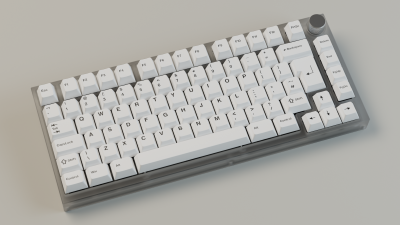 4 5 A 75% ISO-only board with a rotary encoder, RGB underglow and single color dimmable backlight. The hardware is ready to have Bluetooth support added later on. The design is open source and all files (PCB and case) can be found in my [Github repo](https://github.com/ebastler/isometria-75). 6 7 * Keyboard Maintainer: [ebastler](https://github.com/ebastler) 8 * Hardware Supported: Rev1 PCB, see Github repo linked above 9 * Hardware Availability: None, feel free to order/manufacture parts yourself. 10 11 Bootmagic Lite key: Escape 12 Physical reset switch present on the bottom of the PCB 13 14 Make example for this keyboard (after setting up your build environment): 15 16 make ebastler/isometria_75/rev1:default:flash 17 18 See the [build environment setup](https://docs.qmk.fm/#/getting_started_build_tools) and the [make instructions](https://docs.qmk.fm/#/getting_started_make_guide) for more information. Brand new to QMK? Start with our [Complete Newbs Guide](https://docs.qmk.fm/#/newbs). 19 20 21 ## Default keymap layout binds 22 23 Layer 1 toggle: Right menu key (to the right of ralt, left of the arrow cluster) 24 Layer 2 toggle: Right menu key + right shift key 25 26 Alternate layer mod keys (All on layer 1): 27 * Home: Insert 28 * Backspace: Delete 29 30 Alternate layer hardware control keys (All on layer 1): 31 * Esc: Enable/disable underglow 32 * F1/F2: lower/increase underglow brightness 33 * F3/F4: lower/increase backlight brightness 34 * F5/F6: lower/increase underglow hue 35 * F7/F8: lower/increase underglow saturation 36 * F9/F10: previous/next underglow effect 37 * F11/F12: lower/increase underglow effect speed 38 * Print Sreen: Shortcut to static underglow 39 40 Encoder mapping (Layer 0): 41 * CCW/CW: Decrease/Increase volume 42 * Click: Play/Pause 43 44 Encoder mapping (Layer 1): 45 * CCW/CW: Previous/Next track 46 * Click: Mute audio 47 48 Encoder mapping (Layer 2): 49 * CCW/CW: Screen brightness up/down