
readme.md (4128B)
1 # HHKB Alternate Controller (YANG HHKB BLE Mod) 2 3 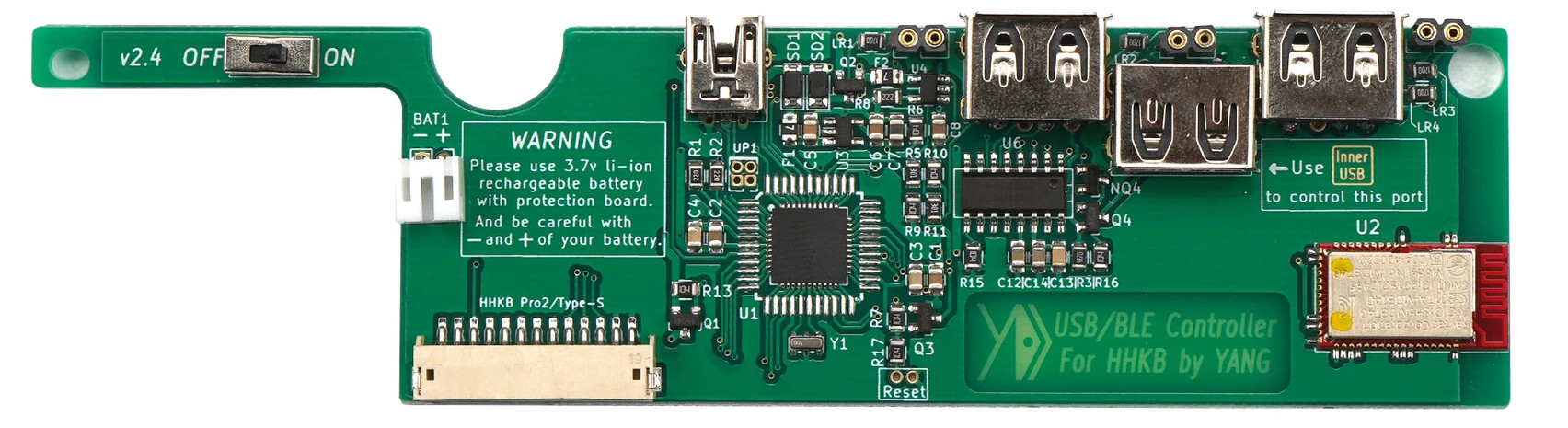 4 5 An alternative controler for the HHKB designed by YANG (yangdigi) 6 based on the hasu controller. 7 8 * Keyboard Maintainer: [Kan-Ru Chen](https://github.com/kanru) 9 * Hardware Supported: YANG HHKB BLE Controller 10 * Hardware Availability: https://kbdfans.com/products/hhkb-ble-mod-upgrade-module 11 12 Make example for this keyboard (after setting up your build environment): 13 14 make hhkb/yang:default 15 16 To flash, first boot your keyboard into bootloader (hold ESC and attach usb cable) 17 then a virtual USB storage should appear. You can copy the `hhkb_yang_default.bin` 18 file to the virtual USB storage and override the `HHKB_BLE.BIN` file in there. 19 20 Make sure to unmount and eject the virtual USB storage. 21 22 ## Features: 23 24 - [x] QMK (via USB) 25 - [x] Bluetooth (BLE) 26 - [x] Power saving mode 27 - [x] Idle mode 28 - [x] Deep sleep mode 29 - [x] LEDs 30 - [x] Battery service 31 - [x] Special commands 32 - [x] Switch BT peer 33 34 ## Entering flash mode 35 36 Different ways to enter flash mode: 37 38 * Press and hold the ESC key. Insert the USB cable to enter the flash 39 mode. When the OS shows the drive disk, you can release the key. 40 41 * Use the magic command LSHIFT+RSHIFT+B to reboot to bootloader then 42 quickly hold the ESC key. 43 44 If you reflash the wrong firmware or did not reflash successfully, you 45 can no longer enter the flash mode, especially the wireless keyboard 46 with battery. You need to turn off the keyboard's power switch, and 47 re-enter the flash mode, reflash the correct firmware. 48 49 After entering the bootloader(flash mode), three indicators on the top 50 right of the HHKB BLE controller will flash. LED3(green) will flash 51 quickly when writing firmware to the controller. 52 53 If these three leds are not soldered or your hhkb case is black, you 54 can't know their status, but you can still see LED3 under the right 55 USB port. 56 57 ## How to reliably flash LUFA MassStorage bootloader on Linux 58 59 The FAT filesystem on Linux very often cannot flush the write cache, 60 leading to broken firmware in the flash. 61 62 We can use `dd` to write to the virtual block storage directly to 63 bypass the vfs layer. 64 65 ``` 66 dd if=FLASH.bin of=<path of virtual block device> seek=4 67 ``` 68 69 Skip 4 sectors because the default sector size of the virtual device 70 and dd is 512 bytes and the emulated flash file starts at 5th sector. 71 72 ## How to find the path of the virtual block device 73 74 After the keyboard boots into flash mode, on Linux system you should 75 be able to find the block device in `dmesg` logs. 76 77 For exmaple if you type 78 79 ``` 80 sudo dmesg 81 ``` 82 83 You should find something like 84 85 ``` 86 [357885.143593] usb 1-1.4: USB disconnect, device number 24 87 [357885.627740] usb 1-1.4: new full-speed USB device number 25 using xhci_hcd 88 [357885.729486] usb 1-1.4: New USB device found, idVendor=03eb, idProduct=1962, bcdDevice= 0.01 89 [357885.729492] usb 1-1.4: New USB device strings: Mfr=0, Product=0, SerialNumber=0 90 [357885.745620] SCSI subsystem initialized 91 [357885.746712] usb-storage 1-1.4:1.0: USB Mass Storage device detected 92 [357885.746818] scsi host0: usb-storage 1-1.4:1.0 93 [357885.746919] usbcore: registered new interface driver usb-storage 94 [357885.747689] usbcore: registered new interface driver uas 95 [357886.766755] scsi 0:0:0:0: Direct-Access LUFA Bootloader 0.00 PQ: 0 ANSI: 0 96 [357886.773216] scsi 0:0:0:0: Attached scsi generic sg0 type 0 97 [357886.777474] sd 0:0:0:0: [sdx] 134 512-byte logical blocks: (68.6 kB/67.0 KiB) 98 [357886.780300] sd 0:0:0:0: [sdx] Write Protect is off 99 [357886.780302] sd 0:0:0:0: [sdx] Mode Sense: 00 00 00 00 100 [357886.783113] sd 0:0:0:0: [sdx] Asking for cache data failed 101 [357886.783114] sd 0:0:0:0: [sdx] Assuming drive cache: write through 102 [357886.842676] sdx: 103 [357886.859528] sd 0:0:0:0: [sdx] Attached SCSI removable disk 104 ``` 105 106 The `sdx` is the block device name and the full path is at `/dev/sdx` 107 The above flash command will become 108 109 ``` 110 dd if=FLASH.bin of=/dev/sdx seek=4 111 ``` 112 113 **Caution**: if set to incorrect device it may wipe out 114 your actual disk. 115 116 ## Help page of original firmware 117 118 http://help.ydkb.io/doku.php?id=en:kb-mods:hhkb-ble