1
2
3
4
5
6
7
8
9
10
11
12
13
14
15
16
17
18
19
20
21
22
23
24
25
26
27
28
29
30
31
32
33
34
35
36
37
38
39
40
41
42
43
44
45
46
47
48
49
50
51
52
53
54
55
56
57
58
59
60
61
62
63
64
65
66
67
68
69
70
71
72
73
74
75
76
77
78
79
80
81
82
83
84
85
86
87
88
89
90
91
92
93
94
95
96
97
98
99
100
101
102
103
104
105
106
107
108
109
110
111
112
113
114
115
116
117
118
119
120
121
122
123
124
125
126
127
128
129
130
131
132
133
134
135
136
137
138
139
140
141
142
143
144
145
146
147
148
149
150
151
152
153
154
155
156
157
158
159
160
161
162
163
164
165
166
|
title: DEADFACE CTF 2023 Shattered Dreams Writeup
date: 2023-10-26 12:00
---
> DEADFACE is on the brink of selling a patient's credit card details from the
Aurora database to a dark web buyer. Investigate Ghost Town for potential leads
on the victim's identity.
A huge hint was dropped immediately, so I went to Ghost Town to find a thread
titled "We got a potential buyer".
The flag's format is `flag{Firstname Lastname}`.
lilith, the original poster of the thread, said the victim's SHA1 hash we need
to look for is "911d1fc5930fa5025dbc2d3953c94de9e4773584" and showed how she
calculated that, including the (lack of) delimeter.
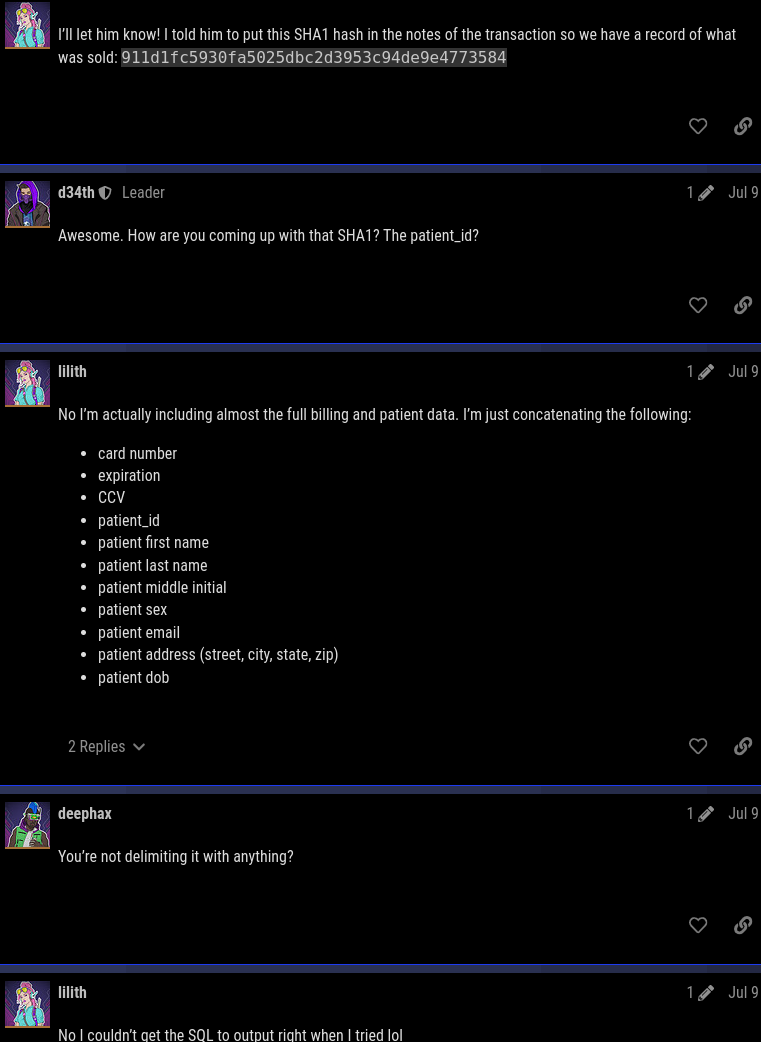
So, we can easily bruteforce getting this SHA1 hash by repeating what lilith
did.
The first three fields (card number, expiration, CCV) are values from the
billing table and the rest of the fields is all the fields in the patient
table.
```sql
CREATE TABLE `billing` (
`billing_id` int(11) NOT NULL AUTO_INCREMENT,
`patient_id` int(11) NOT NULL,
`credit_type_id` int(11) NOT NULL,
`card_num` varchar(24) NOT NULL,
`exp` varchar(8) NOT NULL,
`ccv` varchar(4) NOT NULL,
PRIMARY KEY (`billing_id`),
UNIQUE KEY `card_num` (`card_num`),
KEY `fk_billing_patient_id` (`patient_id`),
KEY `fk_billing_credit_type_id` (`credit_type_id`),
CONSTRAINT `fk_billing_credit_type_id` FOREIGN KEY (`credit_type_id`) REFERENCES `credit_types` (`credit_type_id`) ON DELETE CASCADE,
CONSTRAINT `fk_billing_patient_id` FOREIGN KEY (`patient_id`) REFERENCES `patients` (`patient_id`) ON DELETE CASCADE
) ENGINE=InnoDB AUTO_INCREMENT=14443 DEFAULT CHARSET=utf8mb4 COLLATE=utf8mb4_general_ci;
...
CREATE TABLE `patients` (
`patient_id` int(11) NOT NULL AUTO_INCREMENT,
`first_name` varchar(32) NOT NULL,
`last_name` varchar(64) NOT NULL,
`middle` varchar(8) DEFAULT NULL,
`sex` varchar(8) NOT NULL,
`email` varchar(128) NOT NULL,
`street` varchar(64) NOT NULL,
`city` varchar(64) NOT NULL,
`state` varchar(8) NOT NULL,
`zip` varchar(12) NOT NULL,
`dob` date NOT NULL,
PRIMARY KEY (`patient_id`),
UNIQUE KEY `email` (`email`)
) ENGINE=InnoDB AUTO_INCREMENT=18542 DEFAULT CHARSET=utf8mb4 COLLATE=utf8mb4_general_ci;
```
Since there are no delimeters, they can just be concatenated with each other
and then piped to sha1. The difficult part I had was properly concatenating
those values because I was not able to read the MySQL dump with sqlite3 nor
mariadb.
I noticed that each of the rows that were inserted into the tables were
delimited by a comma, similar to CSV.
```sql
INSERT INTO `patients` VALUES (8151,'Lorrayne','Covey','E','Female','lcovey0@wunderground.com','40411 Old Shore Street','Houston','TX','77201','1985-02-08'),(8152,'Eddy','Omand','S','Female','eomand1@mysql.com','454 Pine View Alley','Columbus','OH','43226','1959-09-29'),(8153,'Renard','Berre','O','Male','rberre2@friendfeed.com','3496 Merrick Center','Pittsburgh','PA','15235','1978-12-05'),(8154,'Galven','Nardrup','M','Male','gnardrup3@mac.com','0 American Road','Denver','CO','80241','1984-04-09'), ...
```
So I was able to easily convert it into a CSV with the following command:
```bash
grep 'INSERT INTO `patients`' aurora.sql \
| sed 's/^INSERT[^(]*//' \
| awk '{gsub(/,\(/, "\n"); gsub(/\)*/, ""); print}'
```
Part of the output is now:
```
...18532,'Becka','Hurlin','T','Female','bhurlin80d@yolasite.com','58 Amoth Way','Ventura','CA','93005','1953-11-14'
18533,'Aluin','Horwell','O','Male','ahorwell80e@cbc.ca','3 Oriole Terrace','Miami','FL','33190','1984-06-24'
18534,'Glennis','Walder','R','Female','gwalder80f@cnet.com','966 Packers Hill','Topeka','KS','66617','1950-01-21'
...
```
One problem I had when I used tr to replace ( with \n was that one of the names
had () in their name for some reason, which messed up the concatenating of the
two files to get the hash. I originally just manually edited it, but the above
with awk is cleaner. The same goes with the 'INSERT INTO ...' part messing things up for the same reason. I didn't save my ~/.ksh_history file with the
commands I ran, so this is a non-ugly version I remade with more awk.
To properly concatenate the data fields, the comma and single quotes should
also be removed, which tr can be used for unlike before.
```bash
grep 'INSERT INTO `patients`' aurora.sql \
| sed 's/^INSERT[^(]*//' \
| awk '{gsub(/,\(/, "\n"); gsub(/\)*/, ""); print}' \
| tr -d "'," >patients_.txt
```
Part of the output prior to being written to a file is now:
```
18527TannerMasselinAMaletmasselin808@google.es10080 Reindahl CourtBoca RatonFL334871957-08-15
18528MerrelYeudeDMalemyeude809@ca.gov7934 Katie PassSaint PaulMN551881951-04-07
18529JeffVan BaarenMMalejvanbaaren80a@sphinn.com58097 Autumn Leaf DriveNew OrleansLA701421984-01-13
```
It is written to a file so that it can be easy to concatenate both the billing
and patient data by using the paste command.
The next part is doing the same with the billing data. Unlike with the patient
data, only three fields from the billing table is used instead of all, so cut
or awk can be used with the delimeter set to a comma.
Before that, we need to know what index (base 1) the three fields are at. The
credit card number, expiry date, and ccv are fields 4, 5, and 6.
```bash
grep 'INSERT INTO `billing`' aurora.sql \
| sed 's/^INSERT[^(]*//' \
| awk '{gsub(/,\(/, "\n"); gsub(/\)*/, ""); print}' \
| cut -d, -f4,5,6 \
| tr -d "'," >billing_.txt
```
Some of the output looks like
```
51087507745678202025-01403
50483770976260922023-07242
50483739134688352023-12501
```
Both tables with the fields have been parsed and saved to two different files, but simply using cat on both the files would simply print the contents of the second file after the first file has finished printing, but we need each line of both the files to be joined together! That's where the paste command comes in. It combines each line of its input files, which is exactly what is required.
These merged lines are then fed into sha1, and finally grep can be used to look for the hash we need and print the victim's name if it shows up.
```bash
target_hash="911d1fc5930fa5025dbc2d3953c94de9e4773584"
paste billing_.txt patients_.txt | tr -d '\t' \
| while read line; do
echo -n "$line" | sha1 \
| grep "$target_hash" && echo "$line" && break
done
```
The outputted line of the victim who had the same hash is:
```
50483743238485412026-0498316314BertonLuchettiXMalebluchetti6ar@taobao.com39 Meadow Ridge TerraceClevelandOH441251964-10-29
```
So, the victim is Berton X. Luchetti, and the flag is `flag{Berton Luchetti}`.
This challenge would probably have been easier if I was able to use proper SQL
commands, but I couldn't do that and standard UNIX tools saved the day. I did
the exact same process of parsing the tables for all the other SQL challenges
and I found it funny that I solved all of them without needing to run a single
SQL command (partly because they didn't load the file).
```
|
