
diff options
Diffstat (limited to 'posts')
| -rw-r--r-- | posts/bctf23_electronical.md | 301 | ||||
| -rw-r--r-- | posts/crewctf24_sniff.md | 369 | ||||
| -rw-r--r-- | posts/csaw23_rebug1.md | 97 | ||||
| -rw-r--r-- | posts/deadface23_hostbusters3.md | 37 | ||||
| -rw-r--r-- | posts/deadface23_shattered-dreams.md | 166 | ||||
| -rw-r--r-- | posts/kobo_clara-custom-distro.md | 281 | ||||
| -rw-r--r-- | posts/kobo_clara-nickel.md | 242 | ||||
| -rw-r--r-- | posts/kobo_clara-plato.md | 128 | ||||
| -rw-r--r-- | posts/st-bitmap-font-fix.md | 35 | ||||
| -rw-r--r-- | posts/tmpfilehost.md | 71 | ||||
| -rw-r--r-- | posts/vfio-win10.md | 316 | ||||
| -rw-r--r-- | posts/workflow_9years.md | 231 |
12 files changed, 2274 insertions, 0 deletions
diff --git a/posts/bctf23_electronical.md b/posts/bctf23_electronical.md new file mode 100644 index 0000000..3f82ecb --- /dev/null +++ b/posts/bctf23_electronical.md | |||
| @@ -0,0 +1,301 @@ | |||
| 1 | title: BCTF23 crypto/Electronical (medium) Writeup | ||
| 2 | date: 2023-10-26 12:00 | ||
| 3 | --- | ||
| 4 | |||
| 5 | > I do all my ciphering electronically. https://electronical.chall.pwnoh.io/ | ||
| 6 | |||
| 7 | When going to the linked site, you get told to encrypt any message or view the | ||
| 8 | site's source code. After submitting a message to encrypt, it returns some hex | ||
| 9 | string. | ||
| 10 | |||
| 11 | The source is: | ||
| 12 | ```python | ||
| 13 | from Crypto.Cipher import AES | ||
| 14 | from flask import Flask, request, abort, send_file | ||
| 15 | import math | ||
| 16 | import os | ||
| 17 | |||
| 18 | app = Flask(__name__) | ||
| 19 | |||
| 20 | key = os.urandom(32) | ||
| 21 | flag = os.environ.get('FLAG', 'bctf{fake_flag_fake_flag_fake_flag_fake_flag}') | ||
| 22 | |||
| 23 | cipher = AES.new(key, AES.MODE_ECB) | ||
| 24 | |||
| 25 | def encrypt(message: str) -> bytes: | ||
| 26 | length = math.ceil(len(message) / 16) * 16 | ||
| 27 | padded = message.encode().ljust(length, b'\0') | ||
| 28 | return cipher.encrypt(padded) | ||
| 29 | |||
| 30 | def decrypt(msg: str) -> bytes: | ||
| 31 | return cipher.decrypt(msg) | ||
| 32 | |||
| 33 | @app.get('/encrypt') | ||
| 34 | def handle_encrypt(): | ||
| 35 | param = request.args.get('message') | ||
| 36 | |||
| 37 | if not param: | ||
| 38 | return abort(400, "Bad") | ||
| 39 | if not isinstance(param, str): | ||
| 40 | return abort(400, "Bad") | ||
| 41 | |||
| 42 | print(encrypt(param + flag)) | ||
| 43 | |||
| 44 | return encrypt(param + flag).hex() | ||
| 45 | |||
| 46 | @app.get('/source') | ||
| 47 | def handle_source(): | ||
| 48 | return send_file(__file__, "text/plain") | ||
| 49 | |||
| 50 | @app.get('/') | ||
| 51 | def handle_home(): | ||
| 52 | return """ | ||
| 53 | <style> | ||
| 54 | form { | ||
| 55 | display: flex; | ||
| 56 | flex-direction: column; | ||
| 57 | max-width: 20em; | ||
| 58 | gap: .5em; | ||
| 59 | } | ||
| 60 | |||
| 61 | input { | ||
| 62 | padding: .4em; | ||
| 63 | } | ||
| 64 | </style> | ||
| 65 | <form action="/encrypt"> | ||
| 66 | <h2><i>ELECTRONICAL</i></h2> | ||
| 67 | <label for="message">Message to encrypt:</label> | ||
| 68 | <input id="message" name="message"></label> | ||
| 69 | <input type="submit" value="Submit"> | ||
| 70 | <a href="/source">Source code</a> | ||
| 71 | </form> | ||
| 72 | """ | ||
| 73 | |||
| 74 | if __name__ == "__main__": | ||
| 75 | app.run() | ||
| 76 | ``` | ||
| 77 | It seems that the flag is appended to the user's message and then encrypted with | ||
| 78 | AES-ECB. The total message is also padded to be a multiple of 16 bytes. | ||
| 79 | |||
| 80 | According to Wikipedia, ECB (electronic codebook) works by dividing a message | ||
| 81 | into blocks of a certain size (like 16 bytes). The problem however is that ECB | ||
| 82 | doesn't attempt to make any encrypted block unique like by adding a salt or | ||
| 83 | nonce, so any blocks of data that are identical would also be identical when | ||
| 84 | encrypted. Wikipedia also has an interesting example of encrypting an image of | ||
| 85 | Tux and a mountain (on French Wikipedia) with AES. | ||
| 86 | |||
| 87 |  | ||
| 88 | |||
| 89 |  | ||
| 90 | |||
| 91 | Through some more searching online, it seems a way to exploit this is with | ||
| 92 | something called a Chosen Plaintext Attack. Since the message before the flag is | ||
| 93 | controlled by us the user (attacker?) and the flag is appended to the end, the | ||
| 94 | provided message can be made in a way that only one byte of the flag needs to be | ||
| 95 | bruteforced at a time. | ||
| 96 | |||
| 97 | Let's say that this is our message: `thischallengesucksFLAG{5om3_!mp0r74nt_$3cr37}` | ||
| 98 | |||
| 99 | This string is 45 characters, so the server would pad this with 3 \0 characters | ||
| 100 | to make it evenly divisible by 16 characters. | ||
| 101 | |||
| 102 | ``` | ||
| 103 | b'thischallengesucksFLAG{5om3_!mp0r74nt_$3cr37}\x00\x00\x00' | ||
| 104 | ``` | ||
| 105 | |||
| 106 | We know what "thischallengesucks" is, but FLAG and anything else after is | ||
| 107 | appended by the server and is what we're trying to find. | ||
| 108 | |||
| 109 | "thischallengesucks" is 18 characters, but if we send a 15 character string, | ||
| 110 | then the first block to be encrypted would be "thischallengesu?", where ? is the | ||
| 111 | mystery character. | ||
| 112 | |||
| 113 | For readability purposes, I'm going to use repeated "0" characters needed | ||
| 114 | instead of "thischallengesucks". | ||
| 115 | |||
| 116 | When passing "000000000000000?" to the server, a certain hex string would be | ||
| 117 | returned (newlines every 32 characters not included in original): | ||
| 118 | |||
| 119 | ``` | ||
| 120 | b57189530dacbb9c5707c1cb0b044a34 | ||
| 121 | 5377049685bb9553a73e4408565505dd | ||
| 122 | 0c614f69c4749b10f8cbc9c735fd7314 | ||
| 123 | 5a9ae527825603a8eb0dba6a0347a4e5 | ||
| 124 | ``` | ||
| 125 | Replacing the ? with any other character would result in only the first row being | ||
| 126 | changed, like with "000000000000000A": | ||
| 127 | |||
| 128 | ``` | ||
| 129 | b2457a857e82a1d5ad919a4bdaf9133a | ||
| 130 | 7835c84bc75d836fad8ca5fbcec086ff | ||
| 131 | 937cf83a682fa26162a65f2295b2b119 | ||
| 132 | 6b398dd6f75e212b1633c5189bdb5689 | ||
| 133 | ``` | ||
| 134 | Since the other three blocks remained the same, the last character in the | ||
| 135 | message being sent simply needs to bruteforced with every printable character | ||
| 136 | until it results in the same block from ?. In this case, that character would be | ||
| 137 | F: | ||
| 138 | |||
| 139 | ``` | ||
| 140 | b57189530dacbb9c5707c1cb0b044a34 | ||
| 141 | 5377049685bb9553a73e4408565505dd | ||
| 142 | 0c614f69c4749b10f8cbc9c735fd7314 | ||
| 143 | 5a9ae527825603a8eb0dba6a0347a4e5 | ||
| 144 | ``` | ||
| 145 | ``` | ||
| 146 | (0000000000000, 14 characters long) | ||
| 147 | 5ec61f1209adfeff202edbba28339f83 | ||
| 148 | 4f7cc7a4c0c553380874383e93408678 | ||
| 149 | ca91d95b091956edb162da583b51051b | ||
| 150 | 33b91ab14b8807348fc98bf223b4b3a5 | ||
| 151 | |||
| 152 | (0000000000000FL, 16 characters long) | ||
| 153 | 5ec61f1209adfeff202edbba28339f83 | ||
| 154 | 4f7cc7a4c0c553380874383e93408678 | ||
| 155 | ca91d95b091956edb162da583b51051b | ||
| 156 | 33b91ab14b8807348fc98bf223b4b3a5 | ||
| 157 | ``` | ||
| 158 | Then the 0 left pad would be decreased by one character and the process repeats | ||
| 159 | until the whole block is done. However, a flag usually won't be just 16 | ||
| 160 | characters long. I had some difficulty trying to bruteforce the 17th character | ||
| 161 | and above because I was prepending and appending the zeros within a single block | ||
| 162 | (between 0 and 15 padded 0s), but that was among a few other issues I had that | ||
| 163 | were the result of the message I was sending being in the format of "pad + | ||
| 164 | known_flag + brute_single_char + pad" where this only worked for the first | ||
| 165 | block. This did not work later because those messages would have the pad bytes | ||
| 166 | in the middle of the message, which did not go well. | ||
| 167 | |||
| 168 | In the end, I realized that I can check the target block hexstring by sending | ||
| 169 | only the padded 0 bytes (or anything else of that length) without other | ||
| 170 | characters and then append my known bytes of the flag and a single other character | ||
| 171 | to fill that block to brute force that last character. | ||
| 172 | |||
| 173 | A visual representation is this: | ||
| 174 | |||
| 175 | ``` | ||
| 176 | Block size: 8 characters | ||
| 177 | |||
| 178 | 7 pad, 0 known | ||
| 179 | XXXXXXX? | ||
| 180 | XXXXXXXF | ||
| 181 | |||
| 182 | 6 pad, 1 known | ||
| 183 | XXXXXX?? | ||
| 184 | XXXXXXFL | ||
| 185 | |||
| 186 | 5 pad, 2 known | ||
| 187 | XXXXX??? | ||
| 188 | XXXXXFLA | ||
| 189 | |||
| 190 | ... | ||
| 191 | |||
| 192 | 0 pad, 7 known | ||
| 193 | FLAG{5o? | ||
| 194 | |||
| 195 | 8 known | ||
| 196 | FLAG{5om | ||
| 197 | ``` | ||
| 198 | This only decrypts the first block, so how I decrypted each additional block was | ||
| 199 | by prepending another block of pad characters (blocksize - 1) and repeating the | ||
| 200 | process. | ||
| 201 | |||
| 202 | ``` | ||
| 203 | 7 pad, 7 known | ||
| 204 | XXXXXXXFLAG{5om? | ||
| 205 | XXXXXXXFLAG{5om3 | ||
| 206 | |||
| 207 | 6 pad, 8 known | ||
| 208 | XXXXXXFLAG{5om3? | ||
| 209 | XXXXXXFLAG{5om3_ | ||
| 210 | |||
| 211 | ... | ||
| 212 | |||
| 213 | 5 pad, 26 known | ||
| 214 | XXXXXFLAG{5om3_!mp0r74nt_$3cr37? | ||
| 215 | XXXXXFLAG{5om3_!mp0r74nt_$3cr37} | ||
| 216 | |||
| 217 | ... | ||
| 218 | 0 pad, 31 known | ||
| 219 | FLAG{5om3_!mp0r74nt_$3cr37}\0\0? | ||
| 220 | FLAG{5om3_!mp0r74nt_$3cr37}\0\0\0 | ||
| 221 | ``` | ||
| 222 | After some automating help with python, I was able to finally get the flag. | ||
| 223 | |||
| 224 | ``` | ||
| 225 | Flag: bctf{1_c4n7_b3l13v3_u_f0und_my_c0d3b00k} | ||
| 226 | ``` | ||
| 227 | |||
| 228 | My python file to solve this was: | ||
| 229 | ```python | ||
| 230 | from requests import get | ||
| 231 | from requests.utils import quote | ||
| 232 | |||
| 233 | # list of characters that will be bruteforced, these are the printable chars | ||
| 234 | chars = [chr(i) for i in range(ord(' '), ord('~') + 1)] | ||
| 235 | # nul character is also checked because that's the pad character | ||
| 236 | chars += '\0' | ||
| 237 | |||
| 238 | def encrypt(msg): | ||
| 239 | #url = "https://electronical.chall.pwnoh.io/encrypt?message=" | ||
| 240 | url = "http://localhost:5000/encrypt?message=" | ||
| 241 | return get(url + quote(msg)).content; | ||
| 242 | |||
| 243 | def calc_padding_for_known(): | ||
| 244 | # divided by 2 because each hex byte is 2 characters long | ||
| 245 | cur = len(encrypt("0")) // 2 | ||
| 246 | |||
| 247 | # 16 chosen because that's the padding chosen in app.py on the server | ||
| 248 | for i in range(2, 16): | ||
| 249 | tmp = len(encrypt("0" * i)) // 2 | ||
| 250 | if tmp > cur: | ||
| 251 | return tmp, tmp - cur, i - 1 | ||
| 252 | # shouldn't come here | ||
| 253 | return 0,0,0 | ||
| 254 | |||
| 255 | totalblocks, bs, pad = calc_padding_for_known() | ||
| 256 | |||
| 257 | print(f"Block size of padding: {bs}, {pad}") | ||
| 258 | |||
| 259 | # first block are known to not be the flag (is all 0 being encrypted) | ||
| 260 | # second block is what's being bruteforced | ||
| 261 | # third block's last character is unknown and being compared with second block | ||
| 262 | #msg = "0" * (bs + bs - 1) + "a" * 1 + "0" * (bs - 1) | ||
| 263 | #cur = encrypt(msg) | ||
| 264 | #print(cur) | ||
| 265 | flag = "" | ||
| 266 | curflag = "" | ||
| 267 | |||
| 268 | tbs = bs * 2 | ||
| 269 | |||
| 270 | for j in range(totalblocks // bs): | ||
| 271 | for i in range(1, bs + 1): | ||
| 272 | known = "0" * (bs * (1 + j) - len(flag) - 1) | ||
| 273 | msg = known | ||
| 274 | target = encrypt(msg).decode("utf-8") | ||
| 275 | |||
| 276 | print(f"\nNew target message: {msg}") | ||
| 277 | print("New target message return:") | ||
| 278 | print('\n'.join([target[A:A + tbs] for A in range(0, len(target), tbs)])) | ||
| 279 | |||
| 280 | target = target[tbs * (0 + j):tbs * (1 + j)] | ||
| 281 | print(f"New target block: {target}") | ||
| 282 | |||
| 283 | for c in chars: | ||
| 284 | msg = known + flag + c | ||
| 285 | print(f"Current character: {c}") | ||
| 286 | print(f"Current message: {msg}") | ||
| 287 | print(f"Target block: {target}") | ||
| 288 | cur = encrypt(msg).decode("utf-8") | ||
| 289 | print('\n'.join([cur[A:A + tbs] for A in range(0, len(cur), tbs)])) | ||
| 290 | |||
| 291 | print(f"Current block: {cur[:tbs]}") | ||
| 292 | |||
| 293 | if (cur[tbs * (0 + j):tbs * (1 + j)] == target): | ||
| 294 | flag += c | ||
| 295 | print(flag) | ||
| 296 | break | ||
| 297 | |||
| 298 | print("\n") | ||
| 299 | curflag += flag | ||
| 300 | print(flag) | ||
| 301 | ``` | ||
diff --git a/posts/crewctf24_sniff.md b/posts/crewctf24_sniff.md new file mode 100644 index 0000000..32d1adb --- /dev/null +++ b/posts/crewctf24_sniff.md | |||
| @@ -0,0 +1,369 @@ | |||
| 1 | title: CrewCTF2024 misc/Sniff Writeup | ||
| 2 | date: 2024-08-04 12:00 | ||
| 3 | --- | ||
| 4 | ## Challenge | ||
| 5 | ### Description | ||
| 6 | > I came across this mysterious device. So I hooked up my logic analyzer | ||
| 7 | and recorded somebody using it. (`capture.sol`) | ||
| 8 | This challenge has two flags in the `flag{}` format | ||
| 9 | > * The first (easier) is the password that was typed on the keyboard. | ||
| 10 | > * The second (significantly harder) is what was display on the screen after the password was entered. | ||
| 11 | |||
| 12 | ### Images | ||
| 13 | 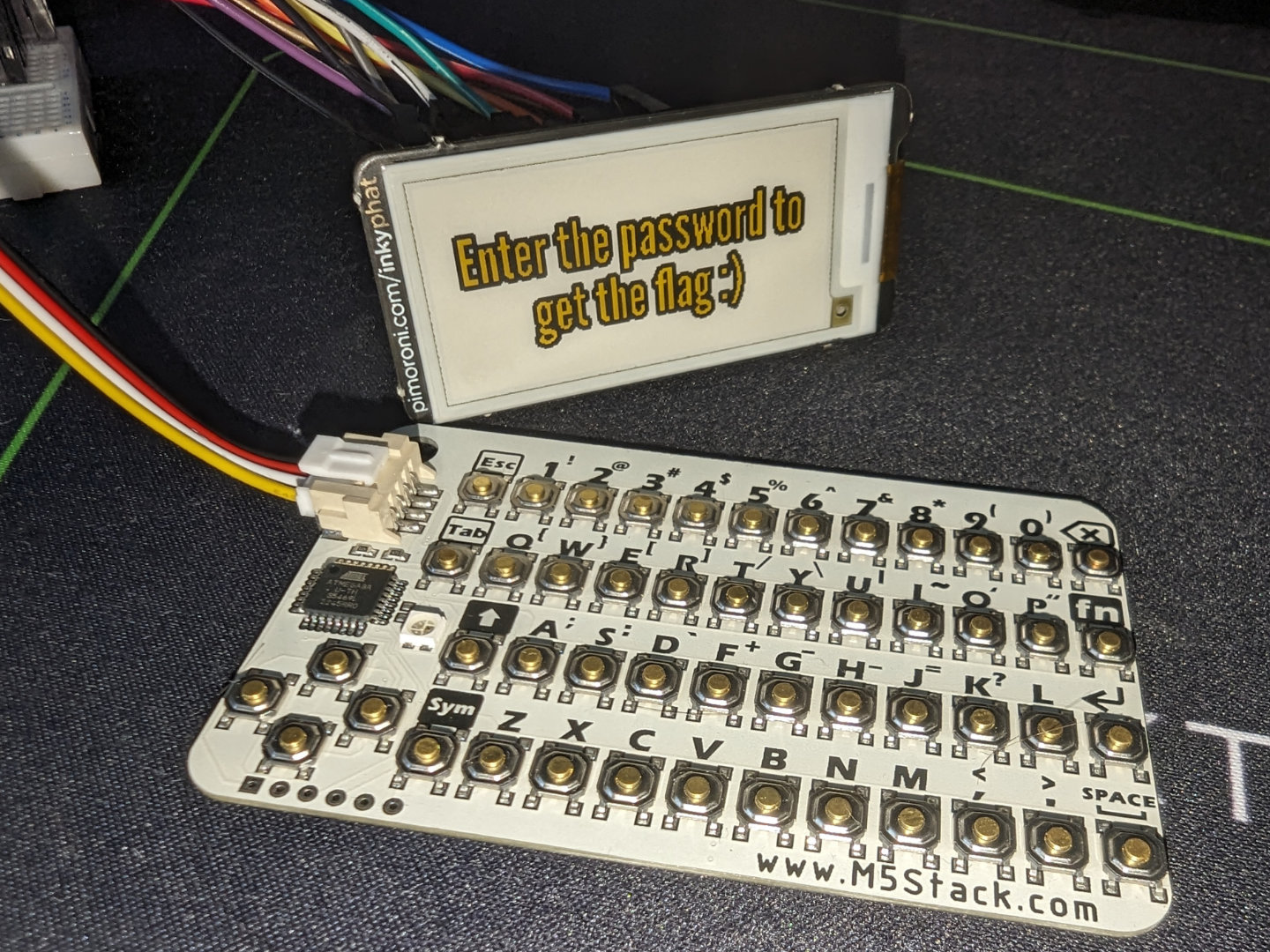 | ||
| 14 | |||
| 15 | 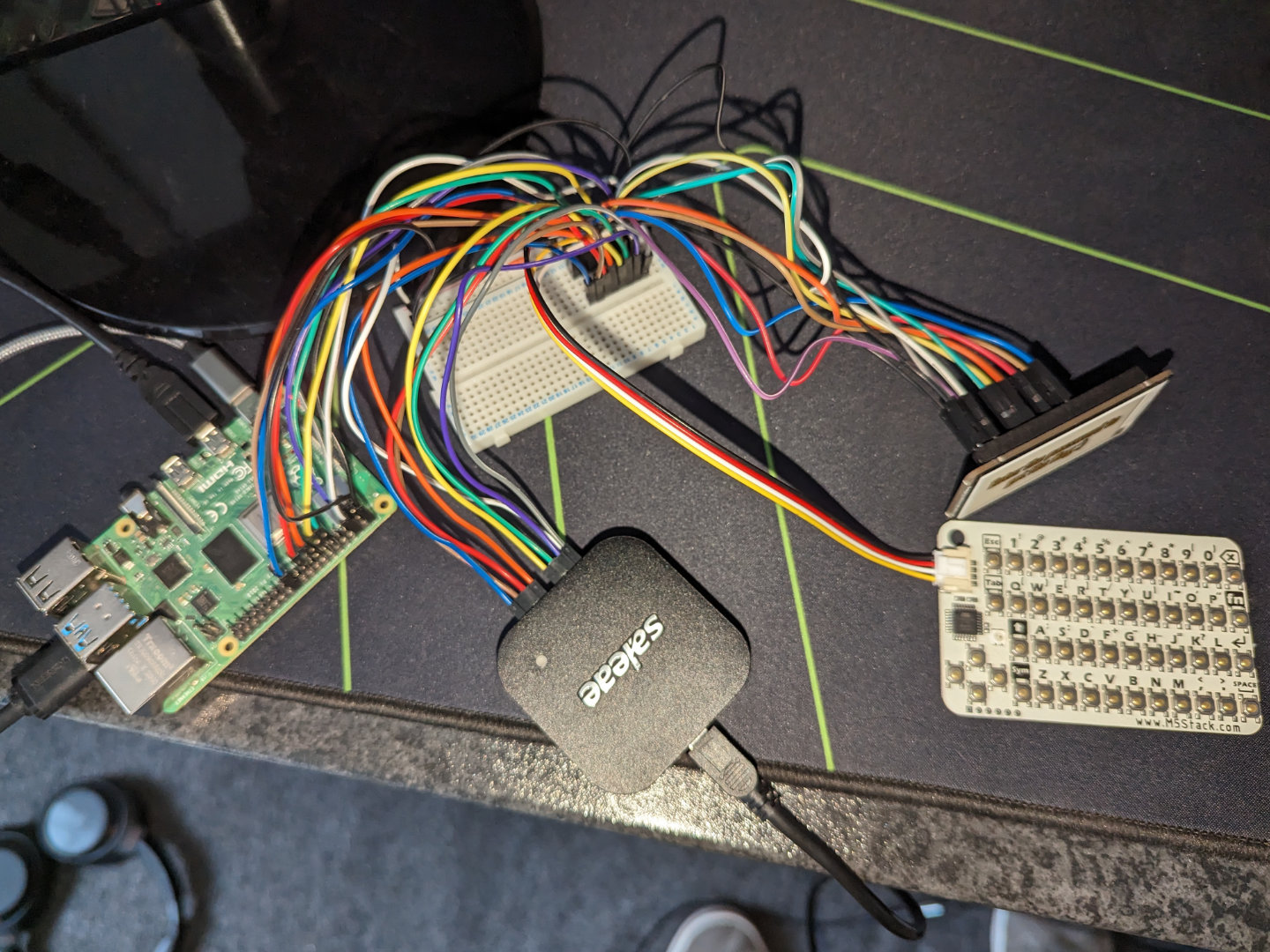 | ||
| 16 | |||
| 17 | 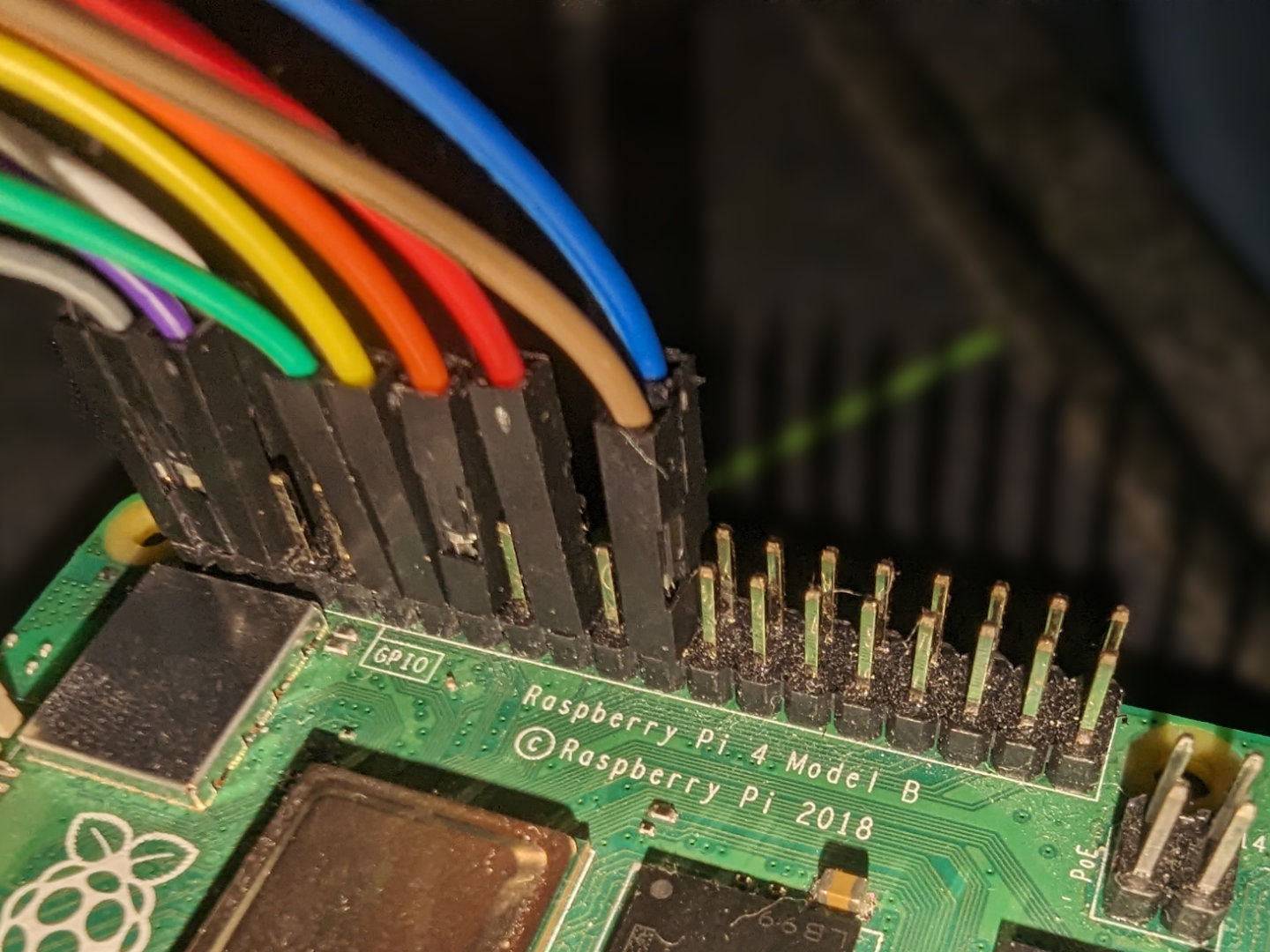 | ||
| 18 | |||
| 19 | 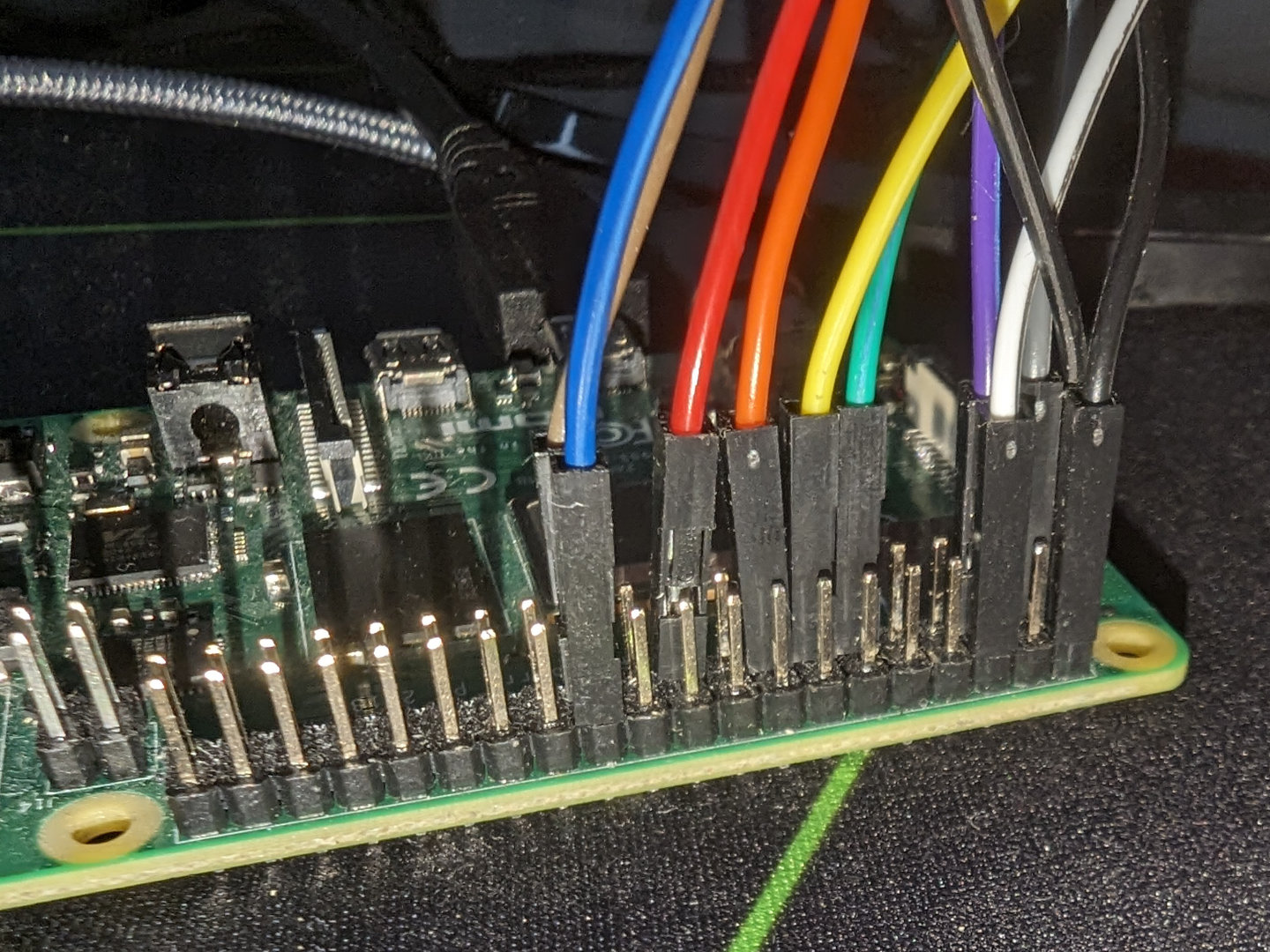 | ||
| 20 | |||
| 21 | 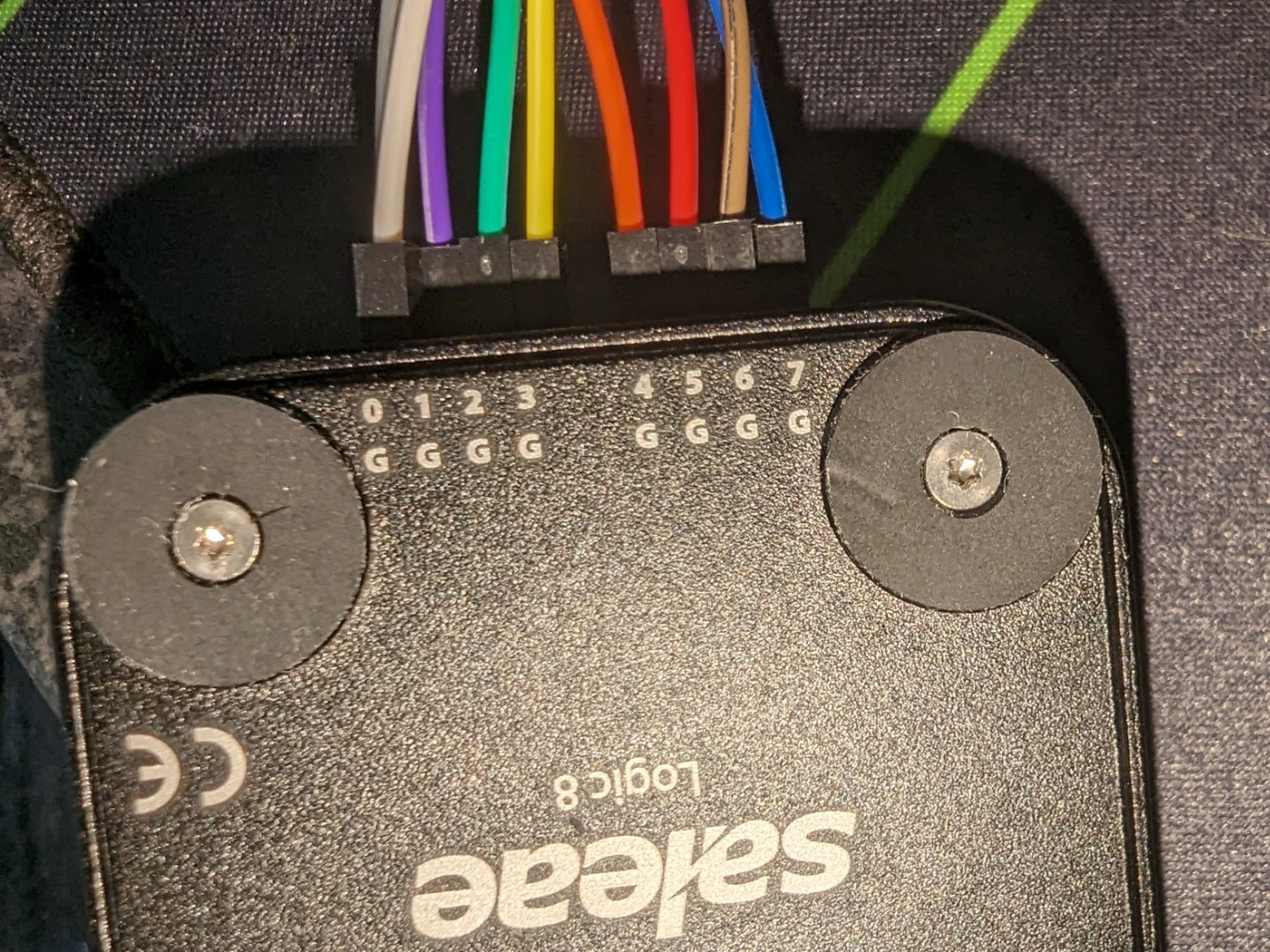 | ||
| 22 | |||
| 23 | 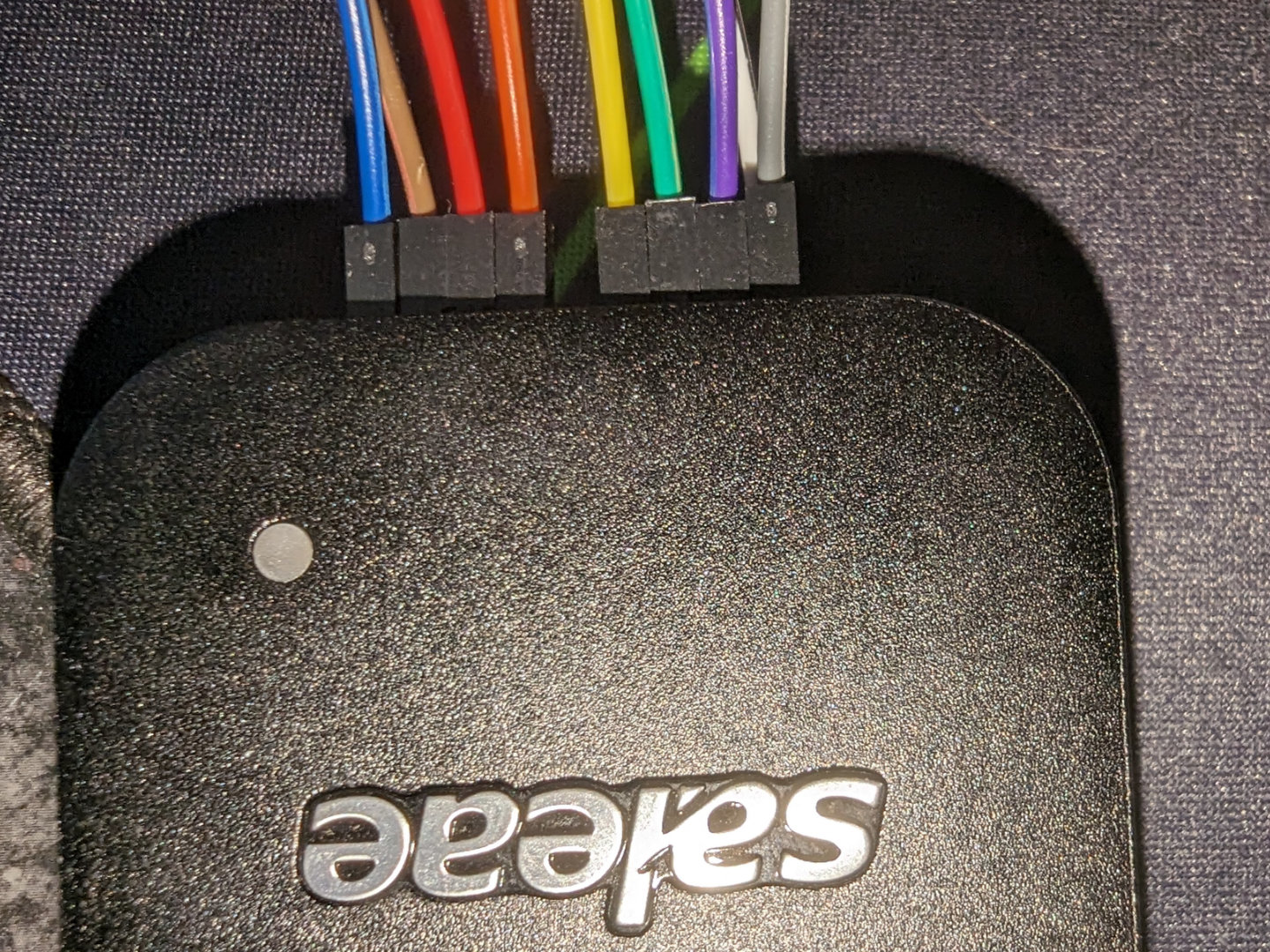 | ||
| 24 | |||
| 25 | 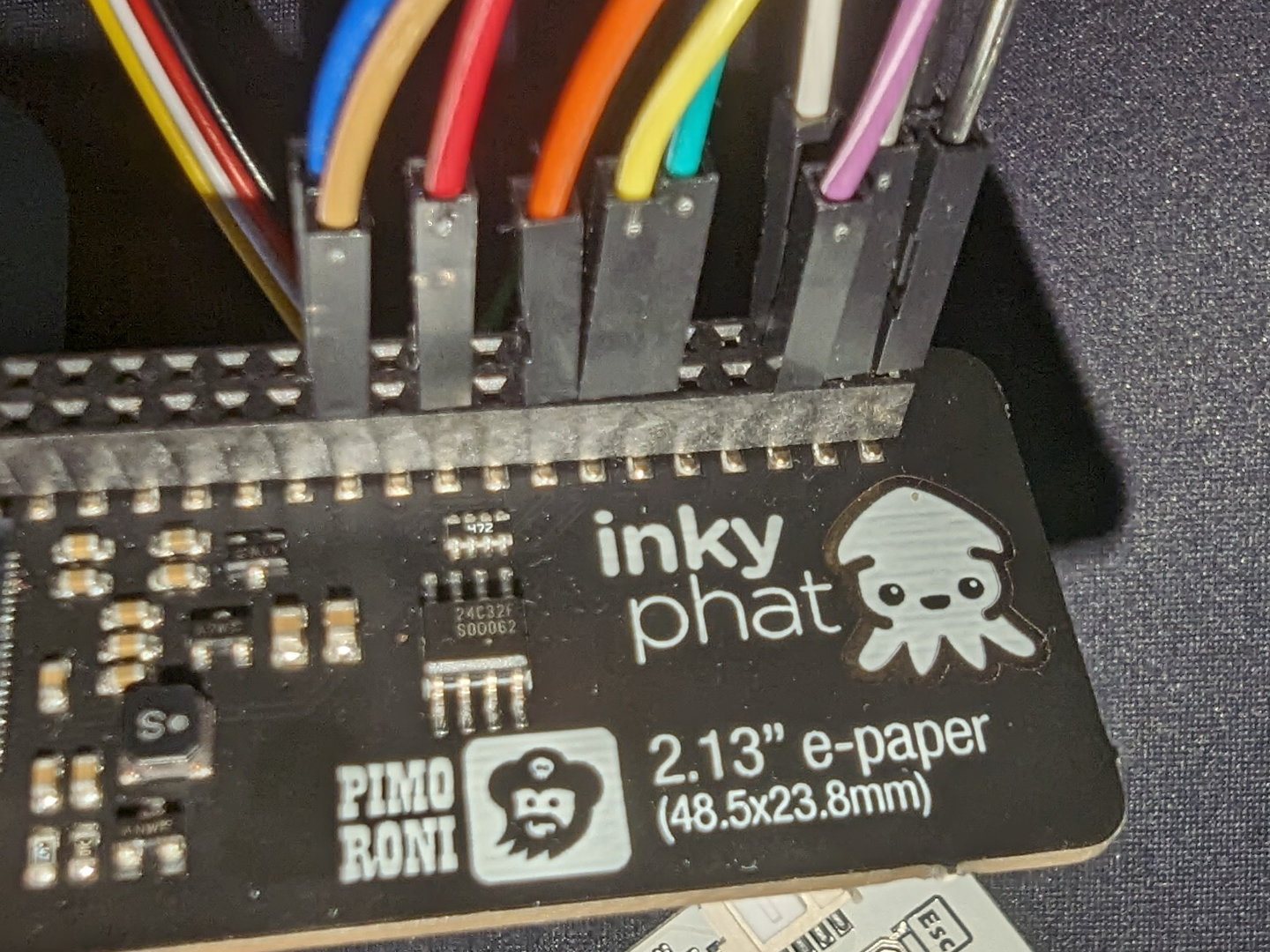 | ||
| 26 | |||
| 27 | 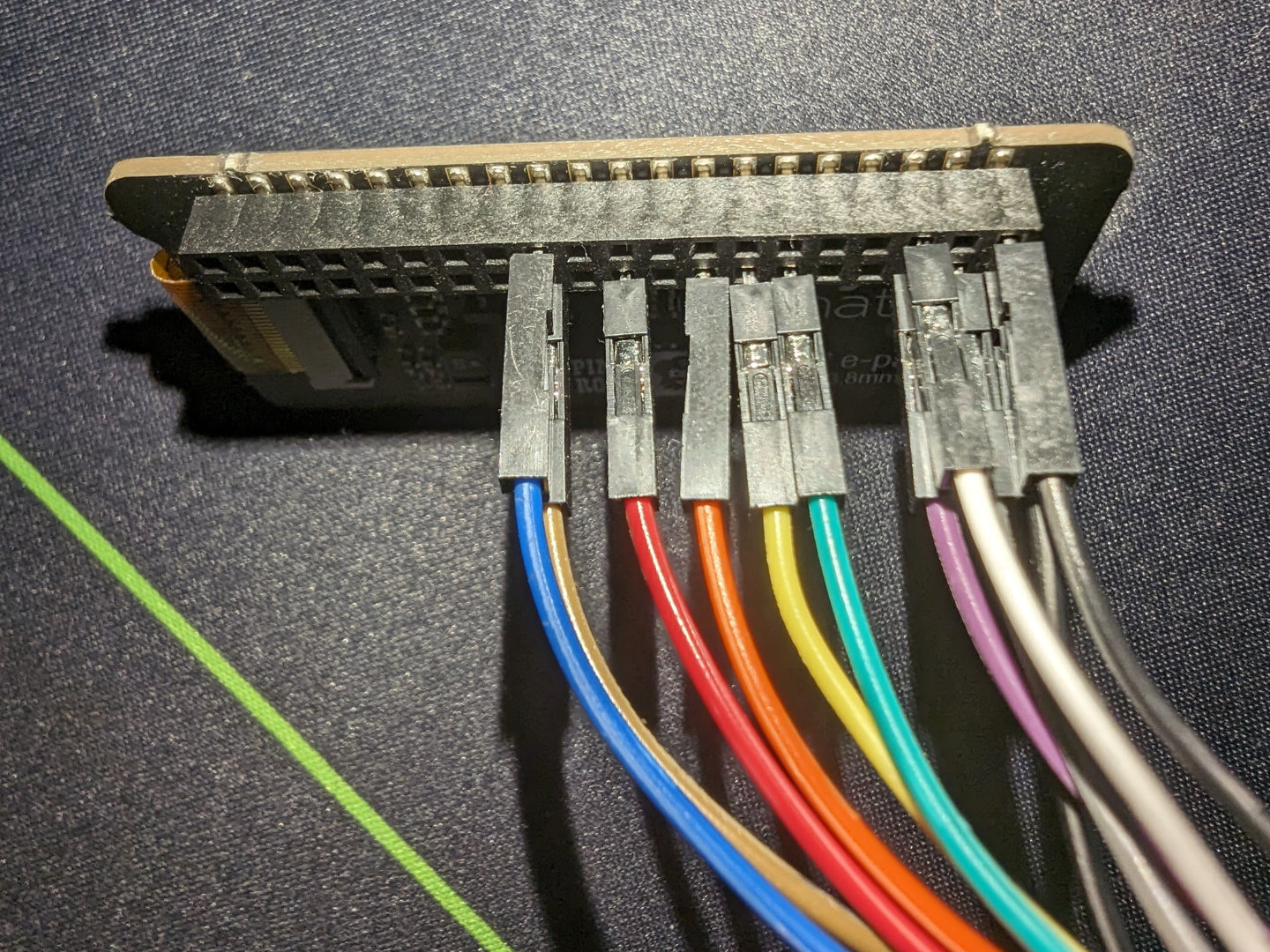 | ||
| 28 | |||
| 29 | ## Intro | ||
| 30 | Instead of sleeping, I made the mistake^Wwise decision of looking at my | ||
| 31 | Discord notification that said there was a hardware challenge in this CTF. It | ||
| 32 | just so happened that there it was using an ATmega-powered keyboard and an | ||
| 33 | e-paper screen, and it almost seemed like a coincidence since I was designing | ||
| 34 | my own keyboard and wanted to interface with an e-paper screen in the near | ||
| 35 | future. This seemed like a great learning opportunity so I started working on | ||
| 36 | the two-part challenge. | ||
| 37 | |||
| 38 | There were a few files inside the `dist.zip`, with the most | ||
| 39 | interesting one being capture.sal which was technically a zip but actually | ||
| 40 | the analyzer file for Salae. Sadly it seemed to need their proprietary | ||
| 41 | program to open. | ||
| 42 | |||
| 43 | 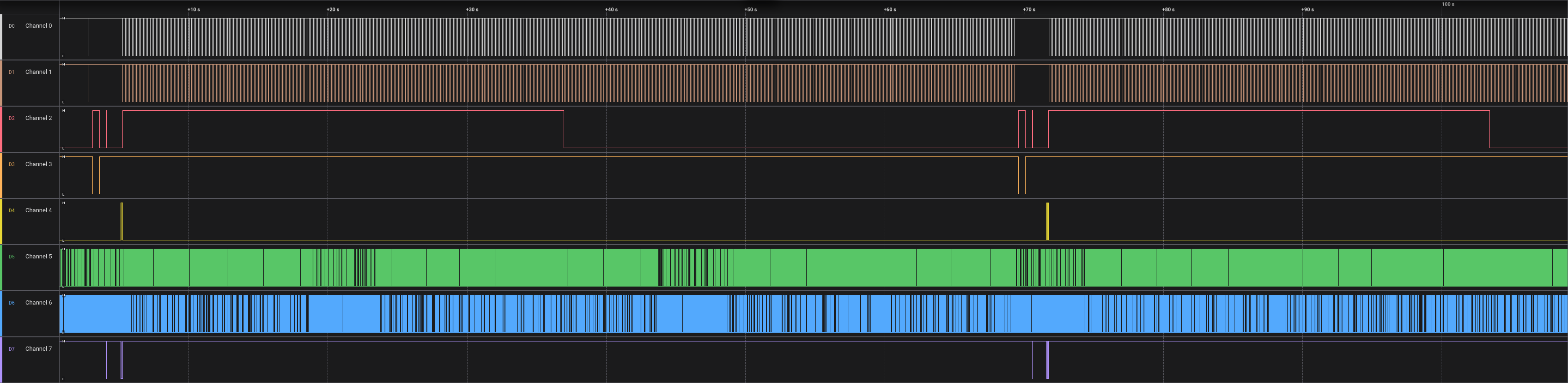 | ||
| 44 | |||
| 45 | The first thing I did was figuring out what each channel was connected to | ||
| 46 | and what it meant. It seemed that the keyboard and display were controlled by | ||
| 47 | the Raspberry Pi which then seemed to go to the logic analyzer. So I looked | ||
| 48 | at what each channel was connected to and based on its connected pin on the | ||
| 49 | Pi, I found its function via pinout.xyz. I ended up with this: | ||
| 50 | |||
| 51 | ``` | ||
| 52 | Channel 0: P03 I2C SDA | ||
| 53 | Channel 1: P05 I2C SCL | ||
| 54 | Channel 2: P11 GPIO 17 (busy) | ||
| 55 | Channel 3: P13 GPIO 27 (reset) | ||
| 56 | Channel 4: P15 GPIO 22 (data/command) | ||
| 57 | Channel 5: P21 MOSI | ||
| 58 | Channel 6: P23 SPI0 SCLK | ||
| 59 | Channel 7: P24 SPI0 CE0 | ||
| 60 | ``` | ||
| 61 | |||
| 62 | 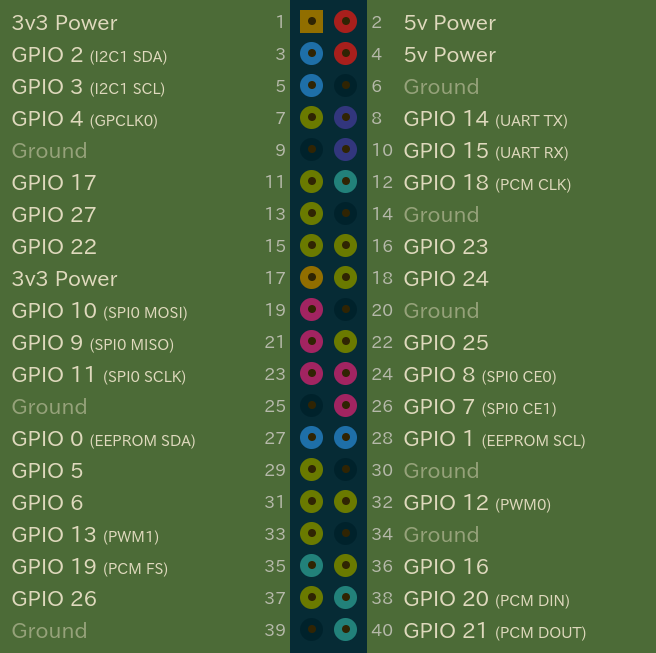 | ||
| 63 | |||
| 64 | ## Part 1 | ||
| 65 | In Logic 2, I opened the I2C analyzer and outputted the dump in the | ||
| 66 | terminal tab into a file | ||
| 67 | |||
| 68 | 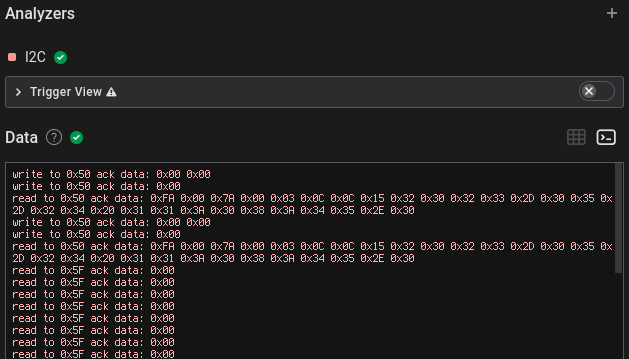 | ||
| 69 | 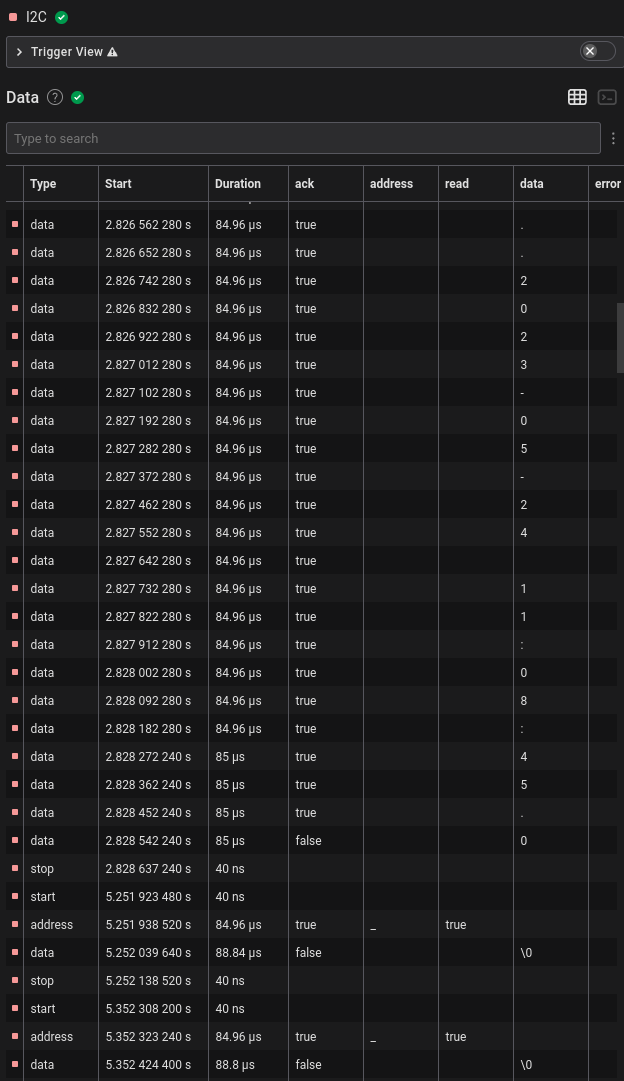 | ||
| 70 | It seemed there was a lot of NUL bytes being sent, probably indicating | ||
| 71 | that there wasn’t anything during that cycle, and a few seconds later there | ||
| 72 | were also some other different bytes with NUL and some `0x01` | ||
| 73 | bytes in between, and these seemed to be printable ASCII. | ||
| 74 | |||
| 75 | ``` | ||
| 76 | read to 0x5F ack data: 0x01 | ||
| 77 | read to 0x5F ack data: 0x01 | ||
| 78 | read to 0x5F ack data: 0x66 | ||
| 79 | read to 0x5F ack data: 0x6c | ||
| 80 | read to 0x5F ack data: 0x61 | ||
| 81 | read to 0x5F ack data: 0x67 | ||
| 82 | read to 0x5F ack data: 0x7b | ||
| 83 | read to 0x5F ack data: 0x37 | ||
| 84 | read to 0x5F ack data: 0x01 | ||
| 85 | read to 0x5F ack data: 0x31 | ||
| 86 | read to 0x5F ack data: 0x37 | ||
| 87 | read to 0x5F ack data: 0x66 | ||
| 88 | read to 0x5F ack data: 0x37 | ||
| 89 | read to 0x5F ack data: 0x35 | ||
| 90 | read to 0x5F ack data: 0x01 | ||
| 91 | read to 0x5F ack data: 0x33 | ||
| 92 | read to 0x5F ack data: 0x32 | ||
| 93 | read to 0x5F ack data: 0x7d | ||
| 94 | read to 0x5F ack data: 0x01 | ||
| 95 | read to 0x5F ack data: 0x0d | ||
| 96 | ``` | ||
| 97 | |||
| 98 | Filtering out the `0x00` and `0x01` data bytes and | ||
| 99 | converting to ASCII results in `flag{717f7532}`. | ||
| 100 | |||
| 101 | ## Part 2 | ||
| 102 | 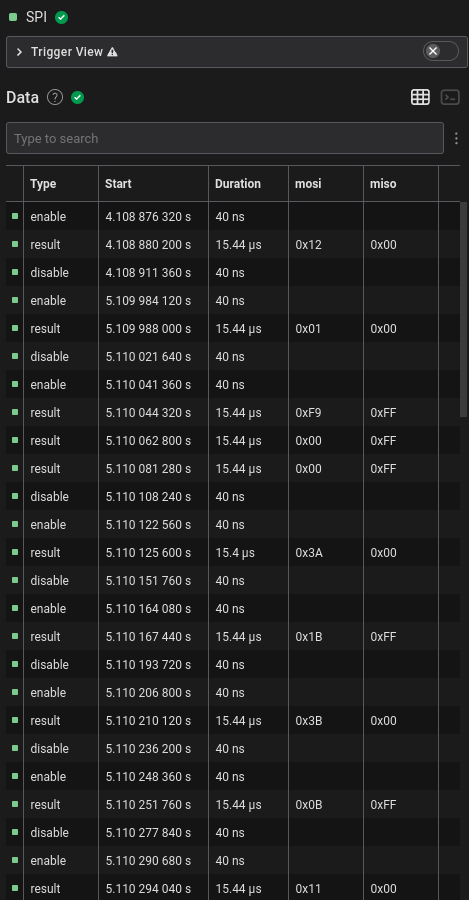 | ||
| 103 | |||
| 104 | I first outputted the SPI dump from the analyzer into a file and kept only | ||
| 105 | the `MOSI` and `MISO` columns. | ||
| 106 | |||
| 107 | ``` | ||
| 108 | Time [s],Packet ID,MOSI,MISO | ||
| 109 | 4.108880200000000,0,0x12,0x00 | ||
| 110 | 5.109988000000000,0,0x01,0x00 | ||
| 111 | 5.110044320000000,0,0xF9,0xFF | ||
| 112 | 5.110062800000000,0,0x00,0xFF | ||
| 113 | 5.110081280000000,0,0x00,0xFF | ||
| 114 | 5.110125600000000,0,0x3A,0x00 | ||
| 115 | 5.110167440000000,0,0x1B,0xFF | ||
| 116 | 5.110210120000000,0,0x3B,0x00 | ||
| 117 | 5.110251760000000,0,0x0B,0xFF | ||
| 118 | ``` | ||
| 119 | |||
| 120 | To actually understand what’s going on, I couldn’t find any proper | ||
| 121 | documentation initially. There wasn’t even a proper datasheet on DigiKey; the | ||
| 122 | “datasheet” was just a summary of the product. | ||
| 123 | |||
| 124 | 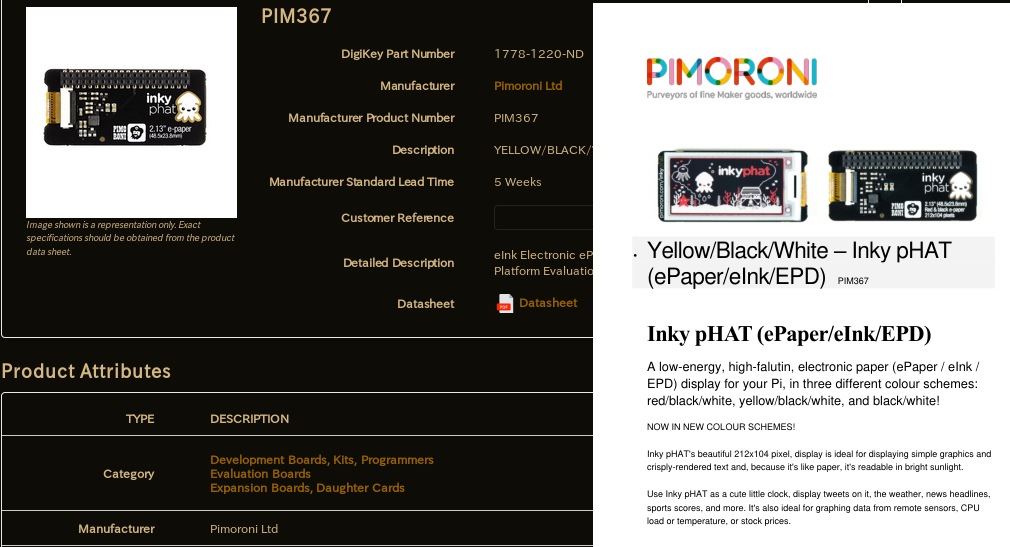 | ||
| 125 | |||
| 126 | Then I found the [Python library | ||
| 127 | source from Pimoroni](https://github.com/pimoroni/inky) of their epaper screens, which is probably what was | ||
| 128 | used to make this challenge. | ||
| 129 | |||
| 130 | ```python | ||
| 131 | def setup(self): | ||
| 132 | """Set up Inky GPIO and reset display.""" | ||
| 133 | if not self._gpio_setup: | ||
| 134 | if self._gpio is None: | ||
| 135 | try: | ||
| 136 | import RPi.GPIO as GPIO | ||
| 137 | self._gpio = GPIO | ||
| 138 | except ImportError: | ||
| 139 | raise ImportError('This library requires the RPi.GPIO module\nInstall with: sudo apt install python-rpi.gpio') | ||
| 140 | self._gpio.setmode(self._gpio.BCM) | ||
| 141 | self._gpio.setwarnings(False) | ||
| 142 | self._gpio.setup(self.dc_pin, self._gpio.OUT, initial=self._gpio.LOW, pull_up_down=self._gpio.PUD_OFF) | ||
| 143 | self._gpio.setup(self.reset_pin, self._gpio.OUT, initial=self._gpio.HIGH, pull_up_down=self._gpio.PUD_OFF) | ||
| 144 | self._gpio.setup(self.busy_pin, self._gpio.IN, pull_up_down=self._gpio.PUD_OFF) | ||
| 145 | |||
| 146 | if self._spi_bus is None: | ||
| 147 | import spidev | ||
| 148 | self._spi_bus = spidev.SpiDev() | ||
| 149 | |||
| 150 | self._spi_bus.open(0, self.cs_pin) | ||
| 151 | self._spi_bus.max_speed_hz = 488000 | ||
| 152 | |||
| 153 | self._gpio_setup = True | ||
| 154 | |||
| 155 | self._gpio.output(self.reset_pin, self._gpio.LOW) | ||
| 156 | time.sleep(0.5) | ||
| 157 | self._gpio.output(self.reset_pin, self._gpio.HIGH) | ||
| 158 | time.sleep(0.5) | ||
| 159 | |||
| 160 | self._send_command(0x12) # Soft Reset | ||
| 161 | time.sleep(1.0) | ||
| 162 | self._busy_wait() | ||
| 163 | |||
| 164 | def _update(self, buf_a, buf_b, busy_wait=True): | ||
| 165 | """Update display. | ||
| 166 | |||
| 167 | Dispatches display update to correct driver. | ||
| 168 | |||
| 169 | :param buf_a: Black/White pixels | ||
| 170 | :param buf_b: Yellow/Red pixels | ||
| 171 | |||
| 172 | """ | ||
| 173 | self.setup() | ||
| 174 | |||
| 175 | self._send_command(ssd1608.DRIVER_CONTROL, [self.rows - 1, (self.rows - 1) >> 8, 0x00]) | ||
| 176 | # Set dummy line period | ||
| 177 | self._send_command(ssd1608.WRITE_DUMMY, [0x1B]) | ||
| 178 | # Set Line Width | ||
| 179 | self._send_command(ssd1608.WRITE_GATELINE, [0x0B]) | ||
| 180 | # Data entry squence (scan direction leftward and downward) | ||
| 181 | self._send_command(ssd1608.DATA_MODE, [0x03]) | ||
| 182 | # Set ram X start and end position | ||
| 183 | xposBuf = [0x00, self.cols // 8 - 1] | ||
| 184 | self._send_command(ssd1608.SET_RAMXPOS, xposBuf) | ||
| 185 | # Set ram Y start and end position | ||
| 186 | yposBuf = [0x00, 0x00, (self.rows - 1) & 0xFF, (self.rows - 1) >> 8] | ||
| 187 | self._send_command(ssd1608.SET_RAMYPOS, yposBuf) | ||
| 188 | # VCOM Voltage | ||
| 189 | self._send_command(ssd1608.WRITE_VCOM, [0x70]) | ||
| 190 | # Write LUT DATA | ||
| 191 | self._send_command(ssd1608.WRITE_LUT, self._luts[self.lut]) | ||
| 192 | |||
| 193 | if self.border_colour == self.BLACK: | ||
| 194 | self._send_command(ssd1608.WRITE_BORDER, 0b00000000) | ||
| 195 | # GS Transition + Waveform 00 + GSA 0 + GSB 0 | ||
| 196 | elif self.border_colour == self.RED and self.colour == 'red': | ||
| 197 | self._send_command(ssd1608.WRITE_BORDER, 0b00000110) | ||
| 198 | # GS Transition + Waveform 01 + GSA 1 + GSB 0 | ||
| 199 | elif self.border_colour == self.YELLOW and self.colour == 'yellow': | ||
| 200 | self._send_command(ssd1608.WRITE_BORDER, 0b00001111) | ||
| 201 | # GS Transition + Waveform 11 + GSA 1 + GSB 1 | ||
| 202 | elif self.border_colour == self.WHITE: | ||
| 203 | self._send_command(ssd1608.WRITE_BORDER, 0b00000001) | ||
| 204 | # GS Transition + Waveform 00 + GSA 0 + GSB 1 | ||
| 205 | |||
| 206 | # Set RAM address to 0, 0 | ||
| 207 | self._send_command(ssd1608.SET_RAMXCOUNT, [0x00]) | ||
| 208 | self._send_command(ssd1608.SET_RAMYCOUNT, [0x00, 0x00]) | ||
| 209 | |||
| 210 | for data in ((ssd1608.WRITE_RAM, buf_a), (ssd1608.WRITE_ALTRAM, buf_b)): | ||
| 211 | cmd, buf = data | ||
| 212 | self._send_command(cmd, buf) | ||
| 213 | |||
| 214 | self._busy_wait() | ||
| 215 | self._send_command(ssd1608.MASTER_ACTIVATE) | ||
| 216 | ``` | ||
| 217 | |||
| 218 | It was also communicating over SPI which seemed to indicate that this was | ||
| 219 | the proper library. Then I looked at the `setup()` and | ||
| 220 | `_update()` functions in | ||
| 221 | `library/inky/inky_ssd1608.py`, and the SPI commands that were | ||
| 222 | sent in the analyzed dump log matched exactly, including each byte of the LUT | ||
| 223 | table. | ||
| 224 | |||
| 225 | All the SPI commands used in the library are used with named constants | ||
| 226 | that are defined `library/inky/ssd1608.py`: | ||
| 227 | |||
| 228 | ```python | ||
| 229 | """Constants for SSD1608 driver IC.""" | ||
| 230 | DRIVER_CONTROL = 0x01 | ||
| 231 | GATE_VOLTAGE = 0x03 | ||
| 232 | SOURCE_VOLTAGE = 0x04 | ||
| 233 | DISPLAY_CONTROL = 0x07 | ||
| 234 | NON_OVERLAP = 0x0B | ||
| 235 | BOOSTER_SOFT_START = 0x0C | ||
| 236 | GATE_SCAN_START = 0x0F | ||
| 237 | DEEP_SLEEP = 0x10 | ||
| 238 | DATA_MODE = 0x11 | ||
| 239 | SW_RESET = 0x12 | ||
| 240 | TEMP_WRITE = 0x1A | ||
| 241 | TEMP_READ = 0x1B | ||
| 242 | TEMP_CONTROL = 0x1C | ||
| 243 | TEMP_LOAD = 0x1D | ||
| 244 | MASTER_ACTIVATE = 0x20 | ||
| 245 | DISP_CTRL1 = 0x21 | ||
| 246 | DISP_CTRL2 = 0x22 | ||
| 247 | WRITE_RAM = 0x24 | ||
| 248 | WRITE_ALTRAM = 0x26 | ||
| 249 | READ_RAM = 0x25 | ||
| 250 | VCOM_SENSE = 0x28 | ||
| 251 | VCOM_DURATION = 0x29 | ||
| 252 | WRITE_VCOM = 0x2C | ||
| 253 | READ_OTP = 0x2D | ||
| 254 | WRITE_LUT = 0x32 | ||
| 255 | WRITE_DUMMY = 0x3A | ||
| 256 | WRITE_GATELINE = 0x3B | ||
| 257 | WRITE_BORDER = 0x3C | ||
| 258 | SET_RAMXPOS = 0x44 | ||
| 259 | SET_RAMYPOS = 0x45 | ||
| 260 | SET_RAMXCOUNT = 0x4E | ||
| 261 | SET_RAMYCOUNT = 0x4F | ||
| 262 | NOP = 0xFF | ||
| 263 | ``` | ||
| 264 | |||
| 265 | I then noticed that there was a long string of bytes being sent after a | ||
| 266 | `0x24` which in the library indicated that it was the memory | ||
| 267 | buffer for the black/white channel ending with a `0x00` | ||
| 268 | `MISO`, with the yellow/red channel afterward with a | ||
| 269 | `0x26` `MOSI` and also ended with `0x00` | ||
| 270 | `MISO` | ||
| 271 | |||
| 272 | ``` | ||
| 273 | ... | ||
| 274 | 0x19,0xFF | ||
| 275 | 0x01,0xFF | ||
| 276 | 0x00,0xFF | ||
| 277 | 0x3C,0x00 | ||
| 278 | 0x01,0xFF | ||
| 279 | 0x4E,0x00 | ||
| 280 | 0x00,0xFF | ||
| 281 | 0x4F,0x00 | ||
| 282 | 0x00,0xFF | ||
| 283 | 0x00,0xFF | ||
| 284 | 0x24,0x00 | ||
| 285 | 0xFF,0xFF | ||
| 286 | 0xFF,0xFF | ||
| 287 | 0xFF,0xFF | ||
| 288 | 0xFF,0xFF | ||
| 289 | 0xFF,0xFF | ||
| 290 | 0xFF,0xFF | ||
| 291 | 0xFF,0xFF | ||
| 292 | 0xFF,0xFF | ||
| 293 | 0xFF,0xFF | ||
| 294 | 0xFF,0xFF | ||
| 295 | ... | ||
| 296 | ``` | ||
| 297 | |||
| 298 | There also seemed to be two different updates at around 5 seconds and 70 | ||
| 299 | seconds. | ||
| 300 | |||
| 301 | 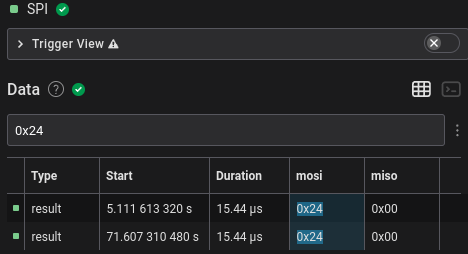 | ||
| 302 | |||
| 303 | However, the number of bytes written was 4250, which wasn’t the 3812.5 or | ||
| 304 | 2756 bytes I was expecting. This wasn’t divisible by 250 nor 122 and so I was | ||
| 305 | stuck for a long time. Looking through the library source for more than an | ||
| 306 | hour with my tired self didn’t help much either. As a last ditch attempt, I | ||
| 307 | tried converting the raw bytes into an image via Pillow, I used the | ||
| 308 | `L` mode (`8bpp`) and just got an uninteresting garbled | ||
| 309 | image. | ||
| 310 | |||
| 311 |  | ||
| 312 | |||
| 313 | ## Part 2 Part 2: Electric Boogaloo | ||
| 314 | 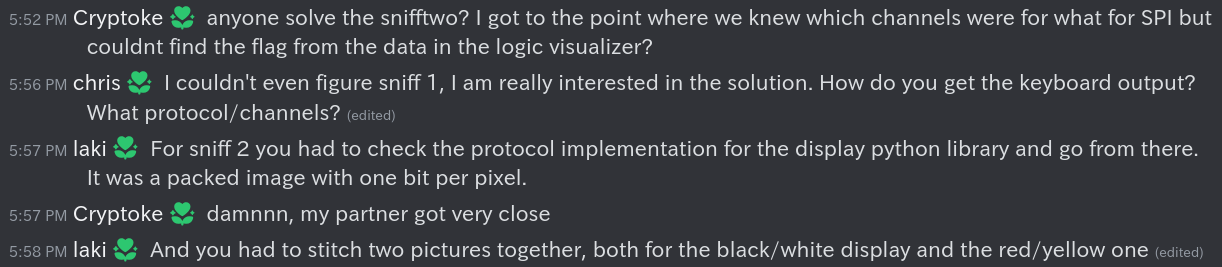 | ||
| 315 | 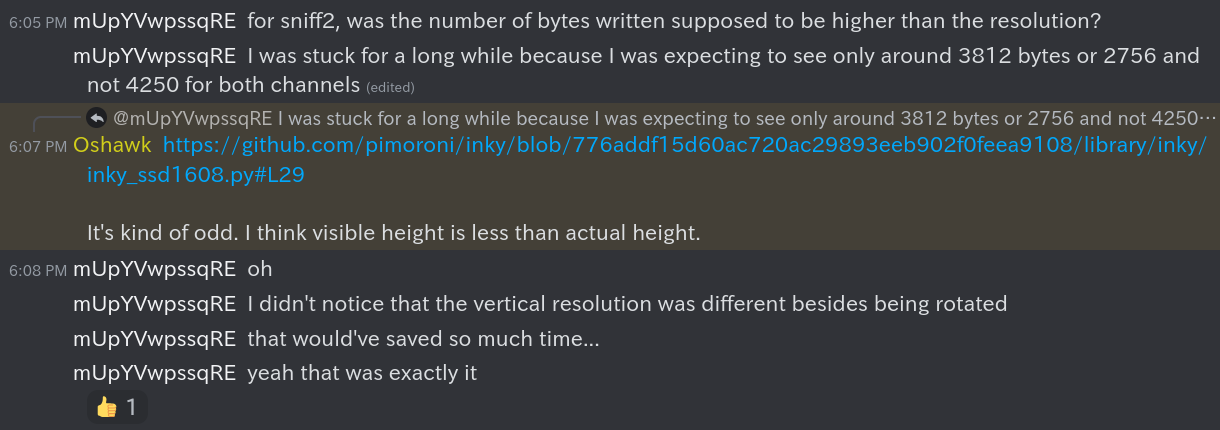 | ||
| 316 | |||
| 317 | After waking up and working on the CTF after it ended, my partner asked on | ||
| 318 | the Discord and found some interesting very helpful information. It turned | ||
| 319 | out the image was a packed 1bpp image. This meant that each byte in the | ||
| 320 | memory framebuffer contained 8 pixels (8 bits / 1 bits per pixel = 8 | ||
| 321 | pixels). | ||
| 322 | |||
| 323 | ```python | ||
| 324 | # under show() | ||
| 325 | buf_a = numpy.packbits(numpy.where(region == BLACK, 0, 1)).tolist() | ||
| 326 | buf_b = numpy.packbits(numpy.where(region == RED, 1, 0)).tolist() | ||
| 327 | ``` | ||
| 328 | |||
| 329 | In the Python source, this was shown by `buf_a` and | ||
| 330 | `buf_b` being packed bits of 1bpp via NumPy. I don’t know much | ||
| 331 | about NumPy, so this was a skill issue as I initially assumed it was a | ||
| 332 | complicated way of saving all the black and red pixels into lists. This is a | ||
| 333 | good reminder that the documentation should be checked for all unfamiliar | ||
| 334 | functions instead of naively assuming what they seem to do. | ||
| 335 | |||
| 336 | Also in addition to the screen being rotated by 90 degrees, the vertical | ||
| 337 | resolution is actually 136 pixels and not 120 according to the driver. | ||
| 338 | |||
| 339 | Knowing all this solved all my problems as 4250 * 8 was indeed divisible | ||
| 340 | by 250 and the actual vertical resolution 136. | ||
| 341 | |||
| 342 | All I had to do was change the Pillow mode when converting the bytes to an | ||
| 343 | image from `L` (8bpp) to `1` (1bpp) and the (rotated) | ||
| 344 | resolution from `(250, 16)` to `(136, 250)` and got an | ||
| 345 | actual image. | ||
| 346 | |||
| 347 | 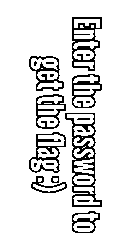 | ||
| 348 | |||
| 349 | I used the first updated bytes which was the screen shown in the | ||
| 350 | challenge’s screenshots. Using the second update’s bytes gave half of the | ||
| 351 | flag in the black/white channel and the other half in the yellow/red | ||
| 352 | channel. | ||
| 353 | |||
| 354 | 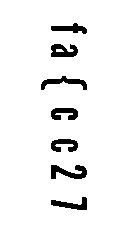 | ||
| 355 |  | ||
| 356 | |||
| 357 | Each character index in both channels seemed to alternate, so the actual | ||
| 358 | flag was `flag{ec9cf2b7}`. After I finished writing this writeup | ||
| 359 | and seeing the two images side-by-side, they probably could’ve been overlayed | ||
| 360 | after one’s colours are inverted, and is probably what was meant by | ||
| 361 | “stitching” the channels together. | ||
| 362 | |||
| 363 | ## Conclusion | ||
| 364 | This was my most favourite CTF challenge by far and I learned a lot, | ||
| 365 | especially about stuff I wanted to learn like how SPI e-paper screens work | ||
| 366 | and not be lost with I2C. I am personally now curious whether the SPI screens | ||
| 367 | can be interfaced directly with the MCU instead of going through an | ||
| 368 | intermediate daughterboard/HAT and how different the protocol for parallel | ||
| 369 | screens are since they’re much faster and use more pins. | ||
diff --git a/posts/csaw23_rebug1.md b/posts/csaw23_rebug1.md new file mode 100644 index 0000000..7e21285 --- /dev/null +++ b/posts/csaw23_rebug1.md | |||
| @@ -0,0 +1,97 @@ | |||
| 1 | title: CSAW23 rev/Rebug1 Writeup | ||
| 2 | date: 2023-09-28 12:00 | ||
| 3 | --- | ||
| 4 | > Can't seem to print out the flag :( Can you figure how to get the flag | ||
| 5 | with this binary? | ||
| 6 | |||
| 7 | An innocent looking binary is given that asks for a string: | ||
| 8 | |||
| 9 | ``` | ||
| 10 | ./test.out | ||
| 11 | Enter the String: rptuainadui | ||
| 12 | that isn't correct, im sorry! | ||
| 13 | ``` | ||
| 14 | |||
| 15 | This is part of the rev category (which I think is for reverse | ||
| 16 | engineering). You could bruteforce this yes, but I found it easier | ||
| 17 | to put this into a decompiler like the ones on [DogBolt (Decompiler | ||
| 18 | Explorer)](https://dogbolt.org/) to see what it's doing. | ||
| 19 | |||
| 20 | Decompiled main function (via angr): | ||
| 21 | |||
| 22 | ``` | ||
| 23 | int main() | ||
| 24 | { | ||
| 25 | char v0; // [bp-0x448] | ||
| 26 | unsigned int v1; // [bp-0x41c] | ||
| 27 | char v2; // [bp-0x418] | ||
| 28 | char v3; // [bp-0x408] | ||
| 29 | unsigned long long v4; // [bp-0x18] | ||
| 30 | unsigned int v5; // [bp-0x10] | ||
| 31 | unsigned int v6; // [bp-0xc] | ||
| 32 | unsigned long long v8; // rax | ||
| 33 | |||
| 34 | printf("Enter the String: "); | ||
| 35 | __isoc99_scanf("%s", (unsigned int)&v3); | ||
| 36 | for (v6 = 0; (&v3)[v6]; v6 += 1); | ||
| 37 | if (v6 == 12) | ||
| 38 | { | ||
| 39 | puts("that's correct!"); | ||
| 40 | v4 = EVP_MD_CTX_new(); | ||
| 41 | (unsigned int)v8 = EVP_md5(); | ||
| 42 | EVP_DigestInit_ex(v4, v8, 0x0, v8); | ||
| 43 | EVP_DigestUpdate(v4, "12", 0x2, "12"); | ||
| 44 | v1 = 16; | ||
| 45 | EVP_DigestFinal_ex(v4, &v2, &v1, &v2); | ||
| 46 | EVP_MD_CTX_free(v4); | ||
| 47 | for (v5 = 0; v5 <= 15; v5 += 1) | ||
| 48 | { | ||
| 49 | sprintf(&(&v0)[2 * v5], "%02x", (&v2)[v5]); | ||
| 50 | } | ||
| 51 | printf("csawctf{%s}\n", (unsigned int)&v0); | ||
| 52 | return 0; | ||
| 53 | } | ||
| 54 | printf("that isn't correct, im sorry!"); | ||
| 55 | return 0; | ||
| 56 | } | ||
| 57 | ``` | ||
| 58 | |||
| 59 | This along with the rest of the decompiled binary can't be simply compiled again | ||
| 60 | as-is because there are a few issues, like the OpenSSL functions being called | ||
| 61 | having an extra argument added to the end. | ||
| 62 | |||
| 63 | When looking at the functions being called, it seems that the flag is just an | ||
| 64 | md5 of the number 12. The program also seems to give the flag itself if you give | ||
| 65 | it the character with the ASCII value of 12 (form feed). | ||
| 66 | |||
| 67 | The line that that has the data being checksummed is this: | ||
| 68 | |||
| 69 | ``` | ||
| 70 | EVP_DigestUpdate(v4, "12", 0x2, "12"); | ||
| 71 | ``` | ||
| 72 | |||
| 73 | I did try piping the form feed character via printf to the binary, but it did | ||
| 74 | not like that, so it seems that the only way to get the flag is through another | ||
| 75 | way. | ||
| 76 | |||
| 77 | While you could just create a very simplified version of the decompiled source | ||
| 78 | with OpenSSL's crypto library (which is what I did originally), it's much easier | ||
| 79 | to just pass the number 12 to a pre-installed md5 command (md5 on OpenBSD, | ||
| 80 | md5sum on Linux). | ||
| 81 | |||
| 82 | ``` | ||
| 83 | $ echo -n 12 | md5 | ||
| 84 | c20ad4d76fe97759aa27a0c99bff6710 | ||
| 85 | ``` | ||
| 86 | |||
| 87 | This CTF's flags were in the format of csawctf{somethinghere}, as also seen in | ||
| 88 | the decompiled source, so the actual flag was this: | ||
| 89 | |||
| 90 | ``` | ||
| 91 | csawctf{c20ad4d76fe97759aa27a0c99bff6710} | ||
| 92 | ``` | ||
| 93 | |||
| 94 | This was my first time doing any decompilation of a program, and I think this | ||
| 95 | was a good start to learn reverse engineering. | ||
| 96 | |||
| 97 | ``` \ No newline at end of file | ||
diff --git a/posts/deadface23_hostbusters3.md b/posts/deadface23_hostbusters3.md new file mode 100644 index 0000000..238ea65 --- /dev/null +++ b/posts/deadface23_hostbusters3.md | |||
| @@ -0,0 +1,37 @@ | |||
| 1 | title: "DEADFACE CTF 2023 Host Busters 3 Writeup" | ||
| 2 | date: 2023-10-26 12:00 | ||
| 3 | --- | ||
| 4 | > Continue characterizing the machine. Is there any way you can | ||
| 5 | escalate to a user that has permissions the vim user does not have? Find | ||
| 6 | the flag associated with this user. | ||
| 7 | Submit the flag as `flag{flag_here}`. | ||
| 8 | |||
| 9 | ``` | ||
| 10 | vim@ghost404.deadface.io letmevim | ||
| 11 | ``` | ||
| 12 | |||
| 13 | You first login to vim, which has vim open. Then you escape from it like you | ||
| 14 | did in the OverTheWire Bandit challenges with `:set shell=bash` and `:shell`. Now you have a proper shell over SSH. | ||
| 15 | |||
| 16 | The first thing I looked at after mistaking Host Busters 1's key in the home | ||
| 17 | directory as 3 was look at what other user home directories there were by | ||
| 18 | running `ls /home`. I saw there were a few users, notably `gh0st404` and | ||
| 19 | `spookyboi`. | ||
| 20 | |||
| 21 | `gh0st404`'s user home directory had his OpenSSH private key as | ||
| 22 | world-readable and in plain sight not in his `.ssh` hidden | ||
| 23 | directory. It being world-readable would have had OpenSSH scream at you, but | ||
| 24 | them being stupid was good for us. | ||
| 25 | |||
| 26 | So, once you use that SSH private key to login as `gh0st404`, | ||
| 27 | you can check the contents of hostbusters3.txt and you got the flag. | ||
| 28 | |||
| 29 | ``` | ||
| 30 | cat hostbusters3.txt | ||
| 31 | ``` | ||
| 32 | |||
| 33 | > "This is why you should have come to the Monday meetings for OverTheWire." | ||
| 34 | ~Joey, FPUSEC President | ||
| 35 | |||
| 36 | [Here's](https://asciinema.org/a/ZhQQwEVwgaqtGCuaqRf6NWu8N) an | ||
| 37 | asciinema of the entire thing in action. | ||
diff --git a/posts/deadface23_shattered-dreams.md b/posts/deadface23_shattered-dreams.md new file mode 100644 index 0000000..899433c --- /dev/null +++ b/posts/deadface23_shattered-dreams.md | |||
| @@ -0,0 +1,166 @@ | |||
| 1 | title: DEADFACE CTF 2023 Shattered Dreams Writeup | ||
| 2 | date: 2023-10-26 12:00 | ||
| 3 | --- | ||
| 4 | > DEADFACE is on the brink of selling a patient's credit card details from the | ||
| 5 | Aurora database to a dark web buyer. Investigate Ghost Town for potential leads | ||
| 6 | on the victim's identity. | ||
| 7 | |||
| 8 | A huge hint was dropped immediately, so I went to Ghost Town to find a thread | ||
| 9 | titled "We got a potential buyer". | ||
| 10 | |||
| 11 | The flag's format is `flag{Firstname Lastname}`. | ||
| 12 | |||
| 13 | lilith, the original poster of the thread, said the victim's SHA1 hash we need | ||
| 14 | to look for is "911d1fc5930fa5025dbc2d3953c94de9e4773584" and showed how she | ||
| 15 | calculated that, including the (lack of) delimeter. | ||
| 16 | |||
| 17 | 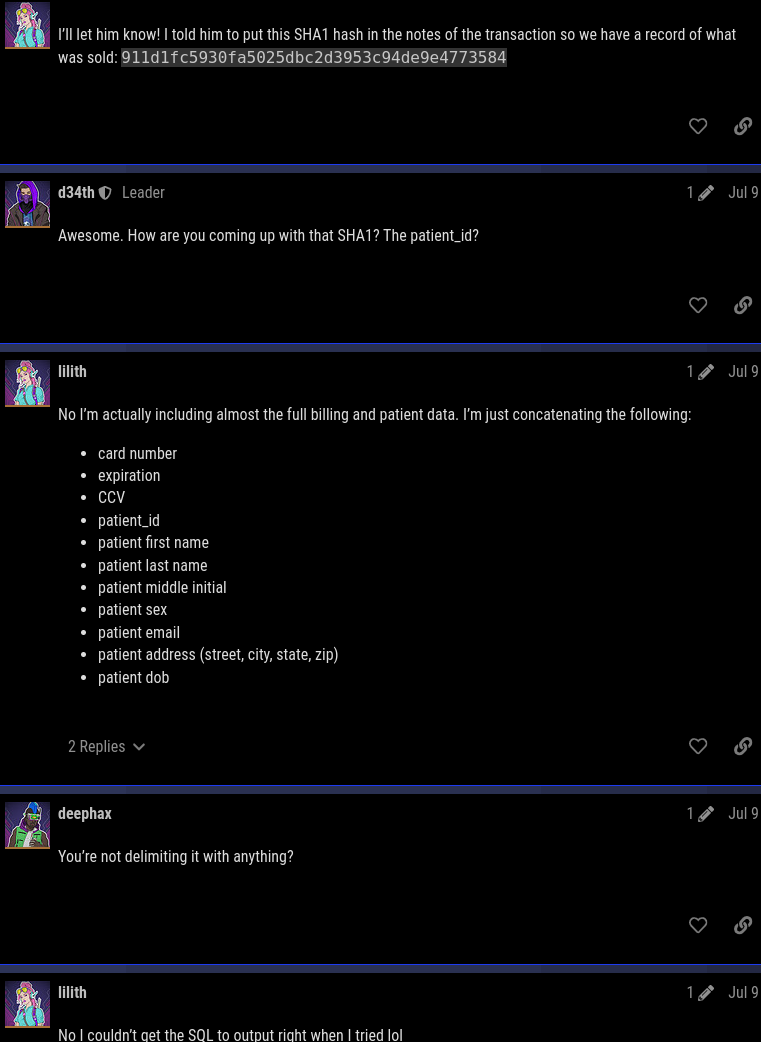 | ||
| 18 | |||
| 19 | So, we can easily bruteforce getting this SHA1 hash by repeating what lilith | ||
| 20 | did. | ||
| 21 | |||
| 22 | The first three fields (card number, expiration, CCV) are values from the | ||
| 23 | billing table and the rest of the fields is all the fields in the patient | ||
| 24 | table. | ||
| 25 | |||
| 26 | ```sql | ||
| 27 | CREATE TABLE `billing` ( | ||
| 28 | `billing_id` int(11) NOT NULL AUTO_INCREMENT, | ||
| 29 | `patient_id` int(11) NOT NULL, | ||
| 30 | `credit_type_id` int(11) NOT NULL, | ||
| 31 | `card_num` varchar(24) NOT NULL, | ||
| 32 | `exp` varchar(8) NOT NULL, | ||
| 33 | `ccv` varchar(4) NOT NULL, | ||
| 34 | PRIMARY KEY (`billing_id`), | ||
| 35 | UNIQUE KEY `card_num` (`card_num`), | ||
| 36 | KEY `fk_billing_patient_id` (`patient_id`), | ||
| 37 | KEY `fk_billing_credit_type_id` (`credit_type_id`), | ||
| 38 | CONSTRAINT `fk_billing_credit_type_id` FOREIGN KEY (`credit_type_id`) REFERENCES `credit_types` (`credit_type_id`) ON DELETE CASCADE, | ||
| 39 | CONSTRAINT `fk_billing_patient_id` FOREIGN KEY (`patient_id`) REFERENCES `patients` (`patient_id`) ON DELETE CASCADE | ||
| 40 | ) ENGINE=InnoDB AUTO_INCREMENT=14443 DEFAULT CHARSET=utf8mb4 COLLATE=utf8mb4_general_ci; | ||
| 41 | ... | ||
| 42 | CREATE TABLE `patients` ( | ||
| 43 | `patient_id` int(11) NOT NULL AUTO_INCREMENT, | ||
| 44 | `first_name` varchar(32) NOT NULL, | ||
| 45 | `last_name` varchar(64) NOT NULL, | ||
| 46 | `middle` varchar(8) DEFAULT NULL, | ||
| 47 | `sex` varchar(8) NOT NULL, | ||
| 48 | `email` varchar(128) NOT NULL, | ||
| 49 | `street` varchar(64) NOT NULL, | ||
| 50 | `city` varchar(64) NOT NULL, | ||
| 51 | `state` varchar(8) NOT NULL, | ||
| 52 | `zip` varchar(12) NOT NULL, | ||
| 53 | `dob` date NOT NULL, | ||
| 54 | PRIMARY KEY (`patient_id`), | ||
| 55 | UNIQUE KEY `email` (`email`) | ||
| 56 | ) ENGINE=InnoDB AUTO_INCREMENT=18542 DEFAULT CHARSET=utf8mb4 COLLATE=utf8mb4_general_ci; | ||
| 57 | ``` | ||
| 58 | |||
| 59 | Since there are no delimeters, they can just be concatenated with each other | ||
| 60 | and then piped to sha1. The difficult part I had was properly concatenating | ||
| 61 | those values because I was not able to read the MySQL dump with sqlite3 nor | ||
| 62 | mariadb. | ||
| 63 | |||
| 64 | I noticed that each of the rows that were inserted into the tables were | ||
| 65 | delimited by a comma, similar to CSV. | ||
| 66 | |||
| 67 | ```sql | ||
| 68 | INSERT INTO `patients` VALUES (8151,'Lorrayne','Covey','E','Female','lcovey0@wunderground.com','40411 Old Shore Street','Houston','TX','77201','1985-02-08'),(8152,'Eddy','Omand','S','Female','eomand1@mysql.com','454 Pine View Alley','Columbus','OH','43226','1959-09-29'),(8153,'Renard','Berre','O','Male','rberre2@friendfeed.com','3496 Merrick Center','Pittsburgh','PA','15235','1978-12-05'),(8154,'Galven','Nardrup','M','Male','gnardrup3@mac.com','0 American Road','Denver','CO','80241','1984-04-09'), ... | ||
| 69 | ``` | ||
| 70 | |||
| 71 | So I was able to easily convert it into a CSV with the following command: | ||
| 72 | |||
| 73 | ```bash | ||
| 74 | grep 'INSERT INTO `patients`' aurora.sql \ | ||
| 75 | | sed 's/^INSERT[^(]*//' \ | ||
| 76 | | awk '{gsub(/,\(/, "\n"); gsub(/\)*/, ""); print}' | ||
| 77 | ``` | ||
| 78 | |||
| 79 | Part of the output is now: | ||
| 80 | |||
| 81 | ``` | ||
| 82 | ...18532,'Becka','Hurlin','T','Female','bhurlin80d@yolasite.com','58 Amoth Way','Ventura','CA','93005','1953-11-14' | ||
| 83 | 18533,'Aluin','Horwell','O','Male','ahorwell80e@cbc.ca','3 Oriole Terrace','Miami','FL','33190','1984-06-24' | ||
| 84 | 18534,'Glennis','Walder','R','Female','gwalder80f@cnet.com','966 Packers Hill','Topeka','KS','66617','1950-01-21' | ||
| 85 | ... | ||
| 86 | ``` | ||
| 87 | |||
| 88 | One problem I had when I used tr to replace ( with \n was that one of the names | ||
| 89 | had () in their name for some reason, which messed up the concatenating of the | ||
| 90 | two files to get the hash. I originally just manually edited it, but the above | ||
| 91 | with awk is cleaner. The same goes with the 'INSERT INTO ...' part messing things up for the same reason. I didn't save my ~/.ksh_history file with the | ||
| 92 | commands I ran, so this is a non-ugly version I remade with more awk. | ||
| 93 | |||
| 94 | To properly concatenate the data fields, the comma and single quotes should | ||
| 95 | also be removed, which tr can be used for unlike before. | ||
| 96 | |||
| 97 | ```bash | ||
| 98 | grep 'INSERT INTO `patients`' aurora.sql \ | ||
| 99 | | sed 's/^INSERT[^(]*//' \ | ||
| 100 | | awk '{gsub(/,\(/, "\n"); gsub(/\)*/, ""); print}' \ | ||
| 101 | | tr -d "'," >patients_.txt | ||
| 102 | ``` | ||
| 103 | |||
| 104 | Part of the output prior to being written to a file is now: | ||
| 105 | |||
| 106 | ``` | ||
| 107 | 18527TannerMasselinAMaletmasselin808@google.es10080 Reindahl CourtBoca RatonFL334871957-08-15 | ||
| 108 | 18528MerrelYeudeDMalemyeude809@ca.gov7934 Katie PassSaint PaulMN551881951-04-07 | ||
| 109 | 18529JeffVan BaarenMMalejvanbaaren80a@sphinn.com58097 Autumn Leaf DriveNew OrleansLA701421984-01-13 | ||
| 110 | ``` | ||
| 111 | |||
| 112 | It is written to a file so that it can be easy to concatenate both the billing | ||
| 113 | and patient data by using the paste command. | ||
| 114 | |||
| 115 | The next part is doing the same with the billing data. Unlike with the patient | ||
| 116 | data, only three fields from the billing table is used instead of all, so cut | ||
| 117 | or awk can be used with the delimeter set to a comma. | ||
| 118 | |||
| 119 | Before that, we need to know what index (base 1) the three fields are at. The | ||
| 120 | credit card number, expiry date, and ccv are fields 4, 5, and 6. | ||
| 121 | |||
| 122 | ```bash | ||
| 123 | grep 'INSERT INTO `billing`' aurora.sql \ | ||
| 124 | | sed 's/^INSERT[^(]*//' \ | ||
| 125 | | awk '{gsub(/,\(/, "\n"); gsub(/\)*/, ""); print}' \ | ||
| 126 | | cut -d, -f4,5,6 \ | ||
| 127 | | tr -d "'," >billing_.txt | ||
| 128 | ``` | ||
| 129 | |||
| 130 | Some of the output looks like | ||
| 131 | |||
| 132 | ``` | ||
| 133 | 51087507745678202025-01403 | ||
| 134 | 50483770976260922023-07242 | ||
| 135 | 50483739134688352023-12501 | ||
| 136 | ``` | ||
| 137 | |||
| 138 | Both tables with the fields have been parsed and saved to two different files, but simply using cat on both the files would simply print the contents of the second file after the first file has finished printing, but we need each line of both the files to be joined together! That's where the paste command comes in. It combines each line of its input files, which is exactly what is required. | ||
| 139 | |||
| 140 | These merged lines are then fed into sha1, and finally grep can be used to look for the hash we need and print the victim's name if it shows up. | ||
| 141 | |||
| 142 | ```bash | ||
| 143 | target_hash="911d1fc5930fa5025dbc2d3953c94de9e4773584" | ||
| 144 | |||
| 145 | paste billing_.txt patients_.txt | tr -d '\t' \ | ||
| 146 | | while read line; do | ||
| 147 | echo -n "$line" | sha1 \ | ||
| 148 | | grep "$target_hash" && echo "$line" && break | ||
| 149 | done | ||
| 150 | ``` | ||
| 151 | |||
| 152 | The outputted line of the victim who had the same hash is: | ||
| 153 | |||
| 154 | ``` | ||
| 155 | 50483743238485412026-0498316314BertonLuchettiXMalebluchetti6ar@taobao.com39 Meadow Ridge TerraceClevelandOH441251964-10-29 | ||
| 156 | ``` | ||
| 157 | |||
| 158 | So, the victim is Berton X. Luchetti, and the flag is `flag{Berton Luchetti}`. | ||
| 159 | |||
| 160 | This challenge would probably have been easier if I was able to use proper SQL | ||
| 161 | commands, but I couldn't do that and standard UNIX tools saved the day. I did | ||
| 162 | the exact same process of parsing the tables for all the other SQL challenges | ||
| 163 | and I found it funny that I solved all of them without needing to run a single | ||
| 164 | SQL command (partly because they didn't load the file). | ||
| 165 | |||
| 166 | ``` \ No newline at end of file | ||
diff --git a/posts/kobo_clara-custom-distro.md b/posts/kobo_clara-custom-distro.md new file mode 100644 index 0000000..f32f836 --- /dev/null +++ b/posts/kobo_clara-custom-distro.md | |||
| @@ -0,0 +1,281 @@ | |||
| 1 | title: Kobo Clara HD Custom Linux Distro/RootFS | ||
| 2 | date: 2021-07-22 12:00 | ||
| 3 | --- | ||
| 4 | |||
| 5 | These are just some notes I made when creating my own mini-distro after | ||
| 6 | wanting something more custom than just using buildroot or making the | ||
| 7 | official firmware more slim. For people other than me, I suggest | ||
| 8 | looking through (C)LFS or running postmarketOS instead once this | ||
| 9 | reader's pull request[1] gets integrated into upstream. | ||
| 10 | |||
| 11 | Two things that'll greatly help with this is having serial terminal | ||
| 12 | access with the four uart pins near the top right in the back of the | ||
| 13 | reader, near the uSD card slot (I don't connect the 5V pin as my reader | ||
| 14 | doesn't really turn on anything other than the power LED). I suggest | ||
| 15 | maybe soldering female pin headers to there to make your life easier | ||
| 16 | (you can later cut out a hole in the back cover or desolder the headers | ||
| 17 | once you're done). Other than that, I suggest installing QEMU with ARM | ||
| 18 | userspace to test programs that you have built or running them on a | ||
| 19 | separate ARM device like a Raspberry Pi. | ||
| 20 | |||
| 21 | ## Prelude | ||
| 22 | Ever since I learnt that the official firmware for the Clara was just | ||
| 23 | using a modified Linux kernel with busybox as coreutils and many other | ||
| 24 | libraries, I just knew that I had to minimize it. I also saw that it | ||
| 25 | was using glibc for it's libc, which I really dislike as statically | ||
| 26 | linking C programs against it was a pain in my experience, compared to | ||
| 27 | something like musl and uclibc. It's also much larger than them and I | ||
| 28 | don't use any of glibc extensions so it seemed like a waste of space to | ||
| 29 | me. | ||
| 30 | |||
| 31 | Initially when I replaced Nickel with Plato, I was able to shave about | ||
| 32 | 100 MiB after I removed /usr/local (which contains Nickel, Qt and a few | ||
| 33 | other things), from 189 MiB to 74 MiB, but I still wanted to make it | ||
| 34 | smaller. | ||
| 35 | |||
| 36 | Using buildroot, I was able to get it under 2 MiB (!!) which was a | ||
| 37 | little less than half the size of an uncompressed armhf Alpine Linux | ||
| 38 | minirootfs (4.9M for 3.14). With Busybox, it was pretty much working | ||
| 39 | out of the box, with serial terminal access! But waiting around 15 | ||
| 40 | minutes for the toolchain to build each time I wanted to change | ||
| 41 | something in the rootfs took way too long, although it could've been | ||
| 42 | minimized if I used ccache with a fairly large cache size. I still | ||
| 43 | found that it compiled and installed a lot of things I wouldn't be | ||
| 44 | using (particularly in /usr) even after disabling almost all of the | ||
| 45 | third-party packages. | ||
| 46 | |||
| 47 | I've uploaded the config file and the resulting rootfs for | ||
| 48 | buildroot 2021.05. The root password by default is changeme. | ||
| 49 | EDIT 2022-10-21: gone, build it yourself | ||
| 50 | |||
| 51 | Of course the rootfs I got from buildroot nor me making the official | ||
| 52 | firmware smaller is the point of this article, and the actual point is | ||
| 53 | making one yourself! (or rather what I did to make my own) | ||
| 54 | |||
| 55 | ## Cross-toolchain | ||
| 56 | For now as of July 22, 2021, I'm using my distro (Void Linux)'s | ||
| 57 | packaged cross toolchain for armhf musl, but eventually I would be | ||
| 58 | using my own. | ||
| 59 | |||
| 60 | I'm not compiling off of the device itself as it would be somewhat slow | ||
| 61 | for bigger programs, which is currently primarily the Linux kernel, | ||
| 62 | U-Boot, and the toolchain itself, considering that the ereader's CPU | ||
| 63 | (Freescale i.MX 6SLL) is a single core running up to 1 GHz. Including | ||
| 64 | the development tools and headers would also take up more space on the | ||
| 65 | device itself, and since the terminal can currently only be accessed | ||
| 66 | through it's serial/uart pins, I don't think it's ideal. | ||
| 67 | |||
| 68 | TODO: include steps to create own toolchain (probably based off of gcc | ||
| 69 | 4.7.3 as that doesn't require c++) | ||
| 70 | |||
| 71 | ## Building the rootfs | ||
| 72 | Assuming you made a new filesystem on your rootfs's partition, it'll | ||
| 73 | likely be empty with no directories you'd expect to find on a regular | ||
| 74 | distro. So you'll just have to make them. | ||
| 75 | cd /path/to/rootfs | ||
| 76 | mkdir bin dev etc proc sbin | ||
| 77 | |||
| 78 | Your binaries would usually go in /bin, the uSD card, ttymxc0, and | ||
| 79 | other devices would go in /dev, felker init's default program/script to | ||
| 80 | execute is usually in /etc/rc, /proc is optional but I have it mounted | ||
| 81 | to see what is currently mounted through /proc/mounts (or mount(1) | ||
| 82 | without any arguments) as well as to see my disk usage through df(1). | ||
| 83 | /sbin is there to place the init in as /sbin/init is the default init | ||
| 84 | path the kernel looks at. | ||
| 85 | |||
| 86 | ## toybox | ||
| 87 | Now on to the main part of the distro, the userspace. I intend to keep | ||
| 88 | it fairly minimal so I've chosen to use toybox along with a slightly | ||
| 89 | modified version of felker (musl dev)'s init[2], as well as dash[3] as | ||
| 90 | the main shell since toybox doesn't include one as of 0.8.5 (though | ||
| 91 | it'll probably be there by 1.0). I'll also be statically linking all | ||
| 92 | the programs that'll be used so I wouldn't have to worry about shared | ||
| 93 | libraries not being included/copied over, and also including LTO for | ||
| 94 | slightly faster binaries. Originally, I tried going with sinit, sbase, | ||
| 95 | and ubase but I was having trouble getting serial terminal access with | ||
| 96 | getty to /dev/ttymxc0 (the default serial tty, at least with the | ||
| 97 | vendor kernel). I didn't have this problem with busybox's and toybox's | ||
| 98 | getty however. My config for toybox was also about 81K smaller than my | ||
| 99 | trimmed sbase-box and ubase-box (352K compared to 267K+166K) where I | ||
| 100 | removed programs that I won't use from ${BIN} in their respective | ||
| 101 | Makefiles. | ||
| 102 | EDIT 2022-10-21: also gone | ||
| 103 | |||
| 104 | First I suggest exporting some environment variables to set the | ||
| 105 | toolchain used as well as enabling static linking and LTO. | ||
| 106 | |||
| 107 | ``` | ||
| 108 | export CROSS_COMPILE="arm-linux-musleabihf-" # change to your cross-tc | ||
| 109 | export CC="${CROSS_COMPILE}gcc" | ||
| 110 | export LDFLAGS="--static" | ||
| 111 | export CFLAGS="-flto -static" | ||
| 112 | export ARCH=arm # for compiling the linux kernel | ||
| 113 | ``` | ||
| 114 | |||
| 115 | To compile toybox, get the source from | ||
| 116 | https://landley.net/toybox/downloads/ (or clone the upstream repo). | ||
| 117 | Then run make menuconfig (optionally with make defconfig before it) and | ||
| 118 | change it as you see fit. Personally, I disabled most of the programs I | ||
| 119 | wouldn't use and kept only the ones that'll help with fixing a problem. | ||
| 120 | Finally, make sure to run make. | ||
| 121 | |||
| 122 | ``` | ||
| 123 | make defconfig | ||
| 124 | make menuconfig | ||
| 125 | make | ||
| 126 | ``` | ||
| 127 | |||
| 128 | To move it to your rootfs and set it's symlinks, you could probably run | ||
| 129 | make install after setting PREFIX to your rootfs's /bin directory, but | ||
| 130 | I did it manually. | ||
| 131 | |||
| 132 | ``` | ||
| 133 | # automatic (didn't test, check README) | ||
| 134 | make PREFIX=/path/to/rootfs/bin/ install | ||
| 135 | |||
| 136 | # (semi?) manual | ||
| 137 | cp toybox /path/to/rootfs/bin | ||
| 138 | |||
| 139 | # add symlinks if doing manual and you want them | ||
| 140 | cd /path/to/rootfs/bin | ||
| 141 | for prog in $(qemu-arm ./toybox); do ln -s toybox "$prog"; done | ||
| 142 | ``` | ||
| 143 | |||
| 144 | ## dash | ||
| 145 | Also as of toybox 0.8.5, a shell still isn't included (probably would | ||
| 146 | be included by 1.0 according to scripts/install.sh as well as a few | ||
| 147 | other programs like gzip), so a separate shell would need to be built. | ||
| 148 | Any can be used but dash would be shown as an example as I was able to | ||
| 149 | get a static binary without too much trouble. | ||
| 150 | |||
| 151 | First obtain the source[3] and cd into its | ||
| 152 | untarred directory. Assuming your CC and CFLAGS are set, you can run | ||
| 153 | these steps: | ||
| 154 | |||
| 155 | ``` | ||
| 156 | autoreconf -fiv | ||
| 157 | ./configure --host=$CROSS_COMPILE --with-libedit | ||
| 158 | make | ||
| 159 | ${CROSS_COMPILE}strip src/dash | ||
| 160 | ``` | ||
| 161 | |||
| 162 | As this is going to be used as the main shell, I've decided to just | ||
| 163 | copy it to /bin/sh in the rootfs directory, though copying it there but | ||
| 164 | as /bin/dash and /bin/sh being symlinked to dash is also an option. | ||
| 165 | |||
| 166 | ``` | ||
| 167 | cp src/dash /path/to/rootfs/bin/sh | ||
| 168 | # or | ||
| 169 | cp src/dash /path/to/rootfs/bin | ||
| 170 | cd /path/to/rootfs/bin | ||
| 171 | ln -s dash sh | ||
| 172 | ``` | ||
| 173 | |||
| 174 | ## felker's init | ||
| 175 | The init is just a single file that you can get from felker's site[2] | ||
| 176 | or the gist on github[7]. I haven't had a good experience with the | ||
| 177 | default startup program (/etc/rc) as a shell script with execve() run | ||
| 178 | on it so I'd change it to execvp() and remove the third (specifies | ||
| 179 | environment). To compile and install the init, all you need to do is | ||
| 180 | run: | ||
| 181 | |||
| 182 | ``` | ||
| 183 | $CC $CFLAGS -o init init.c | ||
| 184 | cp init /path/to/rootfs/sbin | ||
| 185 | ``` | ||
| 186 | |||
| 187 | Instead of /etc/rc being a shell script, you can also make a C program | ||
| 188 | that does whatever you think is needed for a proper startup. I'll still | ||
| 189 | use a shell script though which is linked here. | ||
| 190 | EDIT 2022-10-21: you get the idea, it's gone. | ||
| 191 | |||
| 192 | ## /etc/passwd | ||
| 193 | Copying the rootfs's contents to your device's/uSD card's root | ||
| 194 | partition and then turning the device on should now work with a login | ||
| 195 | prompt shown in the serial terminal. However, you probably wouldn't be | ||
| 196 | able to login to any user. So you'll have to create a file at | ||
| 197 | /path/to/rootfs/etc/passwd. For an empty password to root, you can use | ||
| 198 | this, though I suggest setting a password as soon as you login: | ||
| 199 | |||
| 200 | ``` | ||
| 201 | # in rootfs's /etc/passwd | ||
| 202 | root::0:0:root:/root:/bin/sh | ||
| 203 | ``` | ||
| 204 | |||
| 205 | With the passwd file created/updated, you should now be able to login | ||
| 206 | to root after the rootfs is copied to your uSD card. Your rootfs so far | ||
| 207 | should now be around 550-560K, which is much much smaller than the | ||
| 208 | original firmware's, though it'll likely be much larger to maybe a few | ||
| 209 | megabytes once a proper reader software is added. | ||
| 210 | |||
| 211 | ## Custom Linux Kernel | ||
| 212 | WARNING: I haven't actually gotten the kernel to load in u-boot yet. It | ||
| 213 | just hangs in the "Starting kernel ..." step and the init doesn't get | ||
| 214 | loaded, so I'm assuming the kernel itself isn't either. If anyone out | ||
| 215 | there has gotten a custom kernel working in the Kobo Clara HD, please | ||
| 216 | send me an email or message on xmpp. | ||
| 217 | |||
| 218 | UPDATE Jul 28, 2021: Gave up on it as I just couldn't get any kernels I | ||
| 219 | built (both vendor and akemnade's mainline) to boot. But neither did | ||
| 220 | postmarketOS boot beyond the initial initramfs messages without the log | ||
| 221 | file being created. So I'll revisit this for later. | ||
| 222 | |||
| 223 | EDIT 2022-10-21: I have gotten this working, but have been unable to | ||
| 224 | get Plato build for musl, so I will have to either continue fighting | ||
| 225 | with the crab or create my own with fbink, as that still works. | ||
| 226 | Separate article on this later. | ||
| 227 | |||
| 228 | My next big step is compiling my own kernel for the Clara HD. With the | ||
| 229 | default configuration built for the vendor kernel, it appears to be | ||
| 230 | about 3M, so my goal is to build a kernel that is smaller than that | ||
| 231 | while retaining only the functionality that I need. I'm also not going | ||
| 232 | to include networking support as that is unneeded for my purposes, but | ||
| 233 | I suggest just keeping it if you're unsure. The wifi driver for the | ||
| 234 | Kobo Clara HD is available as an out-of-tree driver[8]. | ||
| 235 | |||
| 236 | You should first obtain the kernel source, with two main options, the | ||
| 237 | vendor kernel[9] and the mainline kernel (with akemnade's | ||
| 238 | patches)[10]. For the latter, you need to clone the repo and switch to | ||
| 239 | the latest kobo/drm-merged branch (kobo/merged-5.13 as of July 25, | ||
| 240 | 2021). | ||
| 241 | |||
| 242 | After you've got them and assuming the CROSS_COMPILE and ARCH | ||
| 243 | environment variables are set, you'd want to configure the kernel. | ||
| 244 | |||
| 245 | I had a hard time compiling the vendor kernel with many things | ||
| 246 | disabled, so I've kept my config somewhat similar to the default | ||
| 247 | config. The config I used is available here (EDIT: dead). | ||
| 248 | |||
| 249 | ``` | ||
| 250 | make menuconfig | ||
| 251 | make zImage | ||
| 252 | ``` | ||
| 253 | |||
| 254 | Assuming it compiles properly and arch/arm/boot/zImage exists, all | ||
| 255 | that's needed to is to write it to your uSD card at the 1M offset. | ||
| 256 | dd if=/path/to/kernel/zImage of=/path/to/uSDdev bs=512 seek=2048 | ||
| 257 | |||
| 258 | ## Custom U-Boot | ||
| 259 | I have not done this yet, nor really plan to, but if you do manage to | ||
| 260 | compile the Kobo's vendored u-boot source, then all you'd have to do to | ||
| 261 | install it is: | ||
| 262 | |||
| 263 | ``` | ||
| 264 | dd if=u-boot-file of=/dev/mmcblk0 bs=128k count=1 seek=6 | ||
| 265 | ``` | ||
| 266 | |||
| 267 | If I remember correctly, this command was included in an older | ||
| 268 | firmware's startup script/rcS for updating udev, and it should still | ||
| 269 | work. | ||
| 270 | |||
| 271 | ## Links | ||
| 272 | [1]: https://gitlab.com/postmarketOS/pmaports/-/merge_requests/2334 | ||
| 273 | [2]: https://ewontfix.com/14 | ||
| 274 | [3]: https://git.kernel.org/pub/scm/utils/dash/dash.git | ||
| 275 | [4]: https://github.com/akemnade/linux/tree/kobo/merged-5.13 | ||
| 276 | [5]: https://misc.andi.de1.cc/kobo/uboot-env.txt | ||
| 277 | [6]: https://misc.andi.de1.cc/kobo/ | ||
| 278 | [7]: https://gist.github.com/rofl0r/6168719/raw/183525e0f0007169a49392b21ceee5b507e3aee8/init.c | ||
| 279 | [8]: https://github.com/jwrdegoede/rtl8189ES_linux/tree/rtl8189fs | ||
| 280 | [9]: https://github.com/kobolabs/Kobo-Reader/blob/master/hw/imx6sll-clara/kernel.tar.bz2 | ||
| 281 | [10]: https://github.com/akemnade/linux/tree/kobo/drm-merged-5.12 | ||
diff --git a/posts/kobo_clara-nickel.md b/posts/kobo_clara-nickel.md new file mode 100644 index 0000000..3dbb068 --- /dev/null +++ b/posts/kobo_clara-nickel.md | |||
| @@ -0,0 +1,242 @@ | |||
| 1 | title: Kobo Clara HD Notes for Nickel | ||
| 2 | date: 2021-01-13 12:00 | ||
| 3 | --- | ||
| 4 | |||
| 5 | My ereader of choice is the Kobo Clara HD and I particularly like it | ||
| 6 | because my eyes hurt less when reading for long periods of time | ||
| 7 | compared to when I read on my phone or when I still had my iPad. It | ||
| 8 | also had much longer battery life and only need to charge it about once | ||
| 9 | every two weeks when I read for about 4 hours on average daily. | ||
| 10 | |||
| 11 | However, the two notable things I don't like about it is it's included | ||
| 12 | telemetry, like using Google Analytics by default and keeping a unique | ||
| 13 | salt | ||
| 14 | |||
| 15 | Spyware/Anti-Features: | ||
| 16 | - Google Analytics (a lot of actions, if not everything, is sent to | ||
| 17 | Google) | ||
| 18 | - Auto-update by default | ||
| 19 | - I prefer being able to review what the new update provides and | ||
| 20 | choose not to apply it | ||
| 21 | - I don't like the new redesign in firmware v4.23.15505 | ||
| 22 | |||
| 23 | I'm also assuming your Kobo reader and it's SD card's device file would | ||
| 24 | be would located at `/dev/sdf` and be mounted at `/mnt/kobo`. | ||
| 25 | |||
| 26 | If you're going to not be using Nickel and instead be using something | ||
| 27 | like [Plato](https://github.com/baskerville/plato), there's a newer version of this article available | ||
| 28 | [here](./kobo-clara-plato.html), but the notes are for ~KSM~ loading Plato directly and not | ||
| 29 | though k/fmon because I don't want to load Nickel if I'm already using | ||
| 30 | a different reader. | ||
| 31 | |||
| 32 | ## Upgrade/Backup Included SD Card | ||
| 33 | While the included 8GB microSD card is decent for storing your ebook | ||
| 34 | library that may not have a lot of images, that would likely not be | ||
| 35 | enough if you were aiming to read some comics on your ereader as they | ||
| 36 | can be pretty big (quite a few of mine are over a gigabyte, with some | ||
| 37 | over. Luckily, you can replace the microSD card with another one. | ||
| 38 | |||
| 39 | Before upgrading, you should backup the SD card to into an image file | ||
| 40 | so the filesystem would be preserved when putting the contents of the | ||
| 41 | image on the new SD card. I'm using the command dd but there might be | ||
| 42 | another program doing the same thing. Even if you're not going to | ||
| 43 | upgrade, I still suggest to backup the SD card in case something goes | ||
| 44 | wrong. | ||
| 45 | ```sh | ||
| 46 | dd if=/dev/sdf of=kobo_sd.img conv=sync | ||
| 47 | ``` | ||
| 48 | |||
| 49 | After this is done, you can plug in your new SD card and reimage | ||
| 50 | kobo_sd.img onto it. With dd, you can do something like: | ||
| 51 | ```sh | ||
| 52 | dd if=kobo_sd.img of=/dev/sdf conv=sync | ||
| 53 | ``` | ||
| 54 | |||
| 55 | Checking it's partition table via lsblk or fdisk -l should show three | ||
| 56 | partitions. If you replaced the SD card with something bigger, than you | ||
| 57 | should resize the third partition. | ||
| 58 | |||
| 59 | ## Bypassing Registration On Setup | ||
| 60 | When setting up your Kobo, you will be asked to sign into a Kobo | ||
| 61 | account. There are other options like logging in via Google, Walmart, | ||
| 62 | and other stores, but I don't like having to login to a device that | ||
| 63 | would likely not be connected to the public internet. Fortunately, you | ||
| 64 | can bypass this by choosing that you cannot connect to a Wi-Fi network | ||
| 65 | and mount your Kobo to your computer. In, `.kobo/KoboReader.sqlite`, you | ||
| 66 | can run: | ||
| 67 | ```sh | ||
| 68 | echo "INSERT INTO user(UserID,UserKey) VALUES('1','');" \ | ||
| 69 | | sqlite3 KoboReader.sqlite | ||
| 70 | ``` | ||
| 71 | |||
| 72 | This way you don't have to install their application just to be able to | ||
| 73 | use your device. | ||
| 74 | |||
| 75 | Note: Do not try doing this when you still have your SD card mounted | ||
| 76 | before you setup your device. The device's screen would likely not | ||
| 77 | update, at least on an early firmware version like v4.7.10733. | ||
| 78 | |||
| 79 | ## Blocking Google Analytics and other Telemetry | ||
| 80 | Just adding 0.0.0.0 analytics.google.com to `/etc/hosts` may be enough to | ||
| 81 | block most of the telemetry from being sent. However, you can try | ||
| 82 | intercepting what connections your Kobo is making via mitmproxy set to | ||
| 83 | transparent mode or using a hosts file that blocks all connections to | ||
| 84 | Google (but not necessarily to Kobo's servers) like [Baobab's hosts file](https://codeberg.org/baobab/hosts) | ||
| 85 | [(raw)](https://codeberg.org/baobab/hosts/raw/branch/master/hosts). | ||
| 86 | EDIT 2022-10-21: Baobab has deleted his account from Codeberg for quite a | ||
| 87 | while, so these two links are dead. Instead, I now recommend [Steven Black's](https://github.com/StevenBlack/hosts) | ||
| 88 | instead [(raw)](https://raw.githubusercontent.com/StevenBlack/hosts/master/hosts). | ||
| 89 | |||
| 90 | To put the hosts file without root (which will be detailed in another | ||
| 91 | section), you can make a directory called etc, put the hosts file in | ||
| 92 | there, and tar it into a file called KoboRoot.tgz. | ||
| 93 | ```sh | ||
| 94 | mkdir etc | ||
| 95 | wget -O etc/hosts https://codeberg.org/baobab/hosts/raw/branch/master/hosts | ||
| 96 | tar czvf KoboRoot.tgz etc | ||
| 97 | cp KoboRoot.tgz /mnt/kobo/.kobo/ | ||
| 98 | ``` | ||
| 99 | |||
| 100 | When you move a tar file with that name into your Kobo's .kobo folder, | ||
| 101 | it's contents gets untarred into it's root at `/` when the device is | ||
| 102 | turned on again, which is usually done for their updates but can be | ||
| 103 | used for custom files like this and gaining root access. | ||
| 104 | |||
| 105 | ## Gaining Root Access via Telnet | ||
| 106 | To gain root access, we first need to get the `/etc/inittab` and | ||
| 107 | `/etc/inetd.conf` which you can get from mounting the SD card's first | ||
| 108 | partition into your computer (the second partition seems to be like a | ||
| 109 | backup). You should copy those two files into a folder called etc | ||
| 110 | somewhere (probably not on the SD card). | ||
| 111 | |||
| 112 | In the `etc/inittab` file, you should add these two lines: | ||
| 113 | ``` | ||
| 114 | ::sysinit:/etc/custominit.sh | ||
| 115 | ::respawn:/usr/sbin/inetd -f /etc/inetd2.conf | ||
| 116 | ``` | ||
| 117 | |||
| 118 | You would want to rename the `etc/inetd.conf` file you copied into | ||
| 119 | `etc/inetd2.conf` (or whatever the custom inetd.conf's filename is) and | ||
| 120 | when editing that, you should add: | ||
| 121 | ``` | ||
| 122 | 23 stream tcp nowait root /bin/busybox telnetd -i | ||
| 123 | ``` | ||
| 124 | |||
| 125 | However, if there is already a commented line for root telnet in the | ||
| 126 | inetd2.conf, you should probably still add the above line and ignore | ||
| 127 | the commented line as that may or may not work (didn't for me). | ||
| 128 | |||
| 129 | To actually start inetd, you should add these lines somewhere in | ||
| 130 | `/etc/custominit.sh`: | ||
| 131 | ```sh | ||
| 132 | mkdir -p /dev/pts | ||
| 133 | mount -t devpts devpts /dev/pts | ||
| 134 | /usr/sbin/inetd /etc/inetd2.conf | ||
| 135 | ``` | ||
| 136 | |||
| 137 | After that, you just have to tar the `etc/` folder again and copy it to | ||
| 138 | your Kobo's onboard/third partition's `.kobo` folder. | ||
| 139 | ```sh | ||
| 140 | tar czvf KoboRoot.tgz etc | ||
| 141 | cp KoboRoot.tgz /mnt/kobo/.kobo/ | ||
| 142 | ``` | ||
| 143 | |||
| 144 | Now you could put your SD card back into your Kobo provided that they | ||
| 145 | are already unmounted and turn your Kobo back on. | ||
| 146 | |||
| 147 | After connecting to the WiFi, simplying telnetting (?) into your Kobo | ||
| 148 | and logging in as root should give you a root shell. :D | ||
| 149 | ```sh | ||
| 150 | telnet $KOBO_IP | ||
| 151 | ``` | ||
| 152 | |||
| 153 | By default, root has no password so you should change it with passwd. | ||
| 154 | |||
| 155 | ## Getting SSH and SFTP access via Dropbear | ||
| 156 | I'm using Dropbear instead of OpenSSH because it's better suited for | ||
| 157 | embedded hardware like the Kobo Clara HD. Obviously we can't copy a | ||
| 158 | binary compiled for amd64 or whatever architecture your compiling | ||
| 159 | computer is running so we would have to cross-compile for our ereader. | ||
| 160 | |||
| 161 | Fortunately, we are not required to cross-compile `gcc`/`clang` and friends | ||
| 162 | as we can simply download the linaro arm toolchain which has the | ||
| 163 | binaries for gcc and others included. You could get the toolchain | ||
| 164 | [here](https://releases.linaro.org/components/toolchain/binaries/latest-7/arm-linux-gnueabihf/) and you should get the release that matches your host's | ||
| 165 | |||
| 166 | architecture. After untarring the file, you should also set your PATH | ||
| 167 | variable to the toolchain's `bin/` folder so you don't have to manually | ||
| 168 | set the CC and CXX variables when building Dropbear. | ||
| 169 | |||
| 170 | ```sh | ||
| 171 | wget https://releases.linaro.org/components/toolchain/binaries/latest-7/arm-linux-gnueabihf/gcc-linaro-7.5.0-2019.12-x86_64_arm-linux-gnueabihf.tar.xz | ||
| 172 | tar xvf gcc-linaro-7.5.0-2019.12-x86_64_arm-linux-gnueabihf.tar.xz | ||
| 173 | export PATH=$(pwd)/gcc-linaro-7.5.0-2019.12-x86_64_arm-linux-gnueabihf/bin:$PATH | ||
| 174 | ``` | ||
| 175 | |||
| 176 | Now you could get the source for Dropbear and cross-compile it. The | ||
| 177 | source can be found on their [homepage](https://matt.ucc.asn.au/dropbear/dropbear.html) or [github](https://github.com/mkj/dropbear/releases) repo. | ||
| 178 | ```sh | ||
| 179 | wget https://matt.ucc.asn.au/dropbear/releases/dropbear-2020.81.tar.bz2 | ||
| 180 | tar xvf dropbear-2020.81.tar.bz2 | ||
| 181 | cd dropbear-2020.81 | ||
| 182 | ./configure --enable-static --host=arm-linux-gnueabihf | ||
| 183 | # MULTI=1 combines the binaries like busybox does and is also smaller in size | ||
| 184 | make MULTI=1 PROGRAMS="dropbear dropbearkey" | ||
| 185 | ``` | ||
| 186 | |||
| 187 | Now you only need to copy the dropbearmulti binary over to your Kobo. | ||
| 188 | What I've done is running `python3 -m http.server` and downloading the | ||
| 189 | file onto my Kobo but you could also just copy it onto the microSD | ||
| 190 | card. | ||
| 191 | ```sh | ||
| 192 | wget your.computer.ip:8000/dropbearmulti | ||
| 193 | chmod +x dropbearmulti | ||
| 194 | mv dropbearmulti /usr/bin | ||
| 195 | cd /usr/bin | ||
| 196 | # below are optional but dropbear(key) would be an argument for dropbearmulti | ||
| 197 | ln -s dropbearmulti dropbear | ||
| 198 | ln -s dropbearmulti dropbearkey | ||
| 199 | ``` | ||
| 200 | |||
| 201 | Now you only need to generate the host keys. My client key is ed25519 | ||
| 202 | so I'm not going to generate the others. | ||
| 203 | ```sh | ||
| 204 | mkdir /etc/dropbear | ||
| 205 | dropbearkey -t ed25519 -f /etc/dropbear/dropbear_ed25519_host_key | ||
| 206 | dropbear -F -r /etc/dropbear/dropbear_ed25519_key | ||
| 207 | ``` | ||
| 208 | |||
| 209 | Now you could `ssh` into your Kobo and login as `root`. Remember to change | ||
| 210 | `root`'s password beforehand though if you haven't already! I suggest | ||
| 211 | copying your public key to your Kobo via `ssh-copy-id` so you don't have | ||
| 212 | to enter root's password all the time and so password-based logins can | ||
| 213 | be disabled in dropbear. | ||
| 214 | |||
| 215 | To start it on boot, you could add the following line to | ||
| 216 | `/etc/inetd2.conf`: | ||
| 217 | ``` | ||
| 218 | 22 stream tcp nowait root /usr/bin/dropbearmulti dropbear -i -r /etc/dropbear/dropbear_ed25519_key | ||
| 219 | ``` | ||
| 220 | |||
| 221 | For some reason, the symlink wasn't resolving for me inetd so I had to | ||
| 222 | call the multi-binary directly. You could also add the command/args | ||
| 223 | into `/etc/custominit.sh`. | ||
| 224 | |||
| 225 | ## FTP Access | ||
| 226 | If you don't or can't use sftp or scp for some reason, there's always ftp :D | ||
| 227 | There's a ftp daemon included in busybox so all we have to do is enable it | ||
| 228 | in `/etc/inetd2.conf`: | ||
| 229 | ``` | ||
| 230 | 21 stream tcp nowait root /bin/busybox ftpd -w -S / | ||
| 231 | ``` | ||
| 232 | |||
| 233 | This would share the entire filesystem so you may or may not want to | ||
| 234 | restrict the shared directory to maybe just your ebook directory | ||
| 235 | (`/mnt/onboard`) and move the files out via `telnet` or `ssh`. | ||
| 236 | EDIT 2022-10-21: A chroot would also work. | ||
| 237 | |||
| 238 | ## References and Other Links | ||
| 239 | - [Rémy's notes on hacking a Kobo Aura H2O](https://remy.grunblatt.org/kobo-aura-h2o-electronic-reader-hacking.html) | ||
| 240 | - [Ying's notes on bypassing registration and setting up telnet, ssh, etc.](https://yingtongli.me/blog/2018/07/30/kobo-rego.html) | ||
| 241 | - [MobileRead forum thread on disabling Google Analytics on the Kobo Touch](https://www.mobileread.com/forums/showthread.php?t=162713) | ||
| 242 | - [MobileRead wiki on hacking the Kobo Touch](https://wiki.mobileread.com/wiki/Kobo_Touch_Hacking) | ||
diff --git a/posts/kobo_clara-plato.md b/posts/kobo_clara-plato.md new file mode 100644 index 0000000..6e6c72a --- /dev/null +++ b/posts/kobo_clara-plato.md | |||
| @@ -0,0 +1,128 @@ | |||
| 1 | title: Kobo Clara HD Notes for Plato (and KSM) | ||
| 2 | date: 2021-03-27 12:00 | ||
| 3 | --- | ||
| 4 | |||
| 5 | These are my notes for getting Plato on the Kobo Clara HD from scratch | ||
| 6 | as well as some notes for getting KSM to work, but I now boot directly | ||
| 7 | into Plato instead of through KSM. | ||
| 8 | |||
| 9 | Previously, I didn't really like using KOReader because it was kind of | ||
| 10 | slow and was written in Lua. At the time of using Plato, it seemed nice | ||
| 11 | but it didn't cover thumbnails for books, which while it is a minor | ||
| 12 | detail, I find books easier to be recognized with a cover thumbnail in | ||
| 13 | addition to their title. This was added in release 0.9.10 but as an | ||
| 14 | optional feature which I didn't somehow see until recently when I | ||
| 15 | retried it. HOWEVER again, I didn't like using k/fmon as I had to still | ||
| 16 | use Nickel to get back into KOReader/Plato/whatever alternate reader | ||
| 17 | when I wanted to go away from using Nickel. | ||
| 18 | |||
| 19 | <ignore> | ||
| 20 | That was when I found out about KSM and how there was a working version | ||
| 21 | for the Clara HD. KSM is like an alternate bootloader for the Kobo | ||
| 22 | readers and it apparently doesn't work very well with newer models like | ||
| 23 | the Clara HD and up, but someone got it to work with those devices. | ||
| 24 | [KSM 09](https://www.mobileread.com/forums/showthread.php?s=c34e41df391c61810a6b06f991c29168&t=293804) is apparently not maintained anymore and I'm not sure if KSM | ||
| 25 | 10 is being developed or not since I'm pretty sure it's closed source. | ||
| 26 | |||
| 27 | > Development and support for KSM stopped some time ago. Therefore, do | ||
| 28 | > not use it! | ||
| 29 | |||
| 30 | "That sign can't stop me because I can't read!" - Me imitating D.W. | ||
| 31 | from the PBS Kids cartoon Arthur on Mar. 26, 2021 when I saw that it | ||
| 32 | can be used on my Kobo | ||
| 33 | |||
| 34 | The latest firmware version that KSM sort of supports is v4.25.15875 | ||
| 35 | but it can probably work with a newer version like v4.26+ that would | ||
| 36 | likely only need a couple changes to /etc/init.d/rcS, if any changes | ||
| 37 | were needed at all. I'll be using v4.26 for the rest of this | ||
| 38 | article/guide. | ||
| 39 | </ignore> | ||
| 40 | |||
| 41 | Recently, after seeing how my Kobo boots into KSM and Nickel through | ||
| 42 | the rcS file, I realized that I could've instead just booted directly | ||
| 43 | into Plato, and plato.sh (the script that runs Plato) has a standalone | ||
| 44 | option that supports just that! The KSM notes are still going to be | ||
| 45 | here in case someone still wants to use KSM. | ||
| 46 | |||
| 47 | ## Installing Plato (or probably any other reader like KOReader) | ||
| 48 | This part probably applies to any other reader other than Plato like | ||
| 49 | KOReader but I haven't personally tested them. All you have to do is | ||
| 50 | [get the latest release](https://github.com/baskerville/plato/releases/latest) at Plato's repo and unzip it's contents into | ||
| 51 | a folder called plato in /path/to/kobo/mount/.adds, the latter folder | ||
| 52 | of which should have already been created by KSM if you are using that. | ||
| 53 | If you are using KSM, there should be a new option below "start nickel" | ||
| 54 | called "start plato" when you have rebooted the device. Read below if | ||
| 55 | you aren't using KSM. | ||
| 56 | |||
| 57 | ## Loading Plato on Boot | ||
| 58 | Since I don't want to load Nickel only to load into another reader like | ||
| 59 | the recommended options in Plato's forum thread (kfmon, fmon, and | ||
| 60 | NickelMenu) suggest, I noticed that I could have booted into Plato | ||
| 61 | directly. The only requirements for doing this having access to the | ||
| 62 | rootfs, so either through a telnet/ssh session, or having the sd card's | ||
| 63 | root/first partition mounted to your computer, or just ftp/rsyncing the | ||
| 64 | files to your Kobo. | ||
| 65 | |||
| 66 | First I suggest making a copy of rcS if you haven't already in case an | ||
| 67 | update overwrites it. My copy is named custominit.sh. Next you'll want | ||
| 68 | the Kobo's /etc/inittab to boot with custominit.sh instead of rcS: | ||
| 69 | /etc/inittab: | ||
| 70 | |||
| 71 | ``` | ||
| 72 | #::sysinit:/etc/init.d/rcS | ||
| 73 | ::sysinit:/etc/custominit.sh | ||
| 74 | ``` | ||
| 75 | |||
| 76 | The rest of the lines don't need to change. Then you should open | ||
| 77 | custominit.sh in your favourite editor to add the lines at the bottom | ||
| 78 | but before hindenburg is executed: | ||
| 79 | |||
| 80 | ``` | ||
| 81 | cd /mnt/onboard/.adds/plato # or whereever Plato is | ||
| 82 | PLATO_STANDALONE=1 ./plato.sh | ||
| 83 | ``` | ||
| 84 | |||
| 85 | You would probably also want to remove the lines where Nickel-specific | ||
| 86 | programs/scripts are running like nickel, hindenburg, pickel, sickel, | ||
| 87 | etc. | ||
| 88 | |||
| 89 | Now on subsequent boots, Plato should automatically have been loaded. | ||
| 90 | Boot times may also be slightly faster! :D | ||
| 91 | |||
| 92 | ## Installing KSM 09 (not doing anymore) | ||
| 93 | First you would want to [download the Clara HD version of KSM 09](https://www.mobileread.com/forums/attachment.php?s=902078ac2e6fe8ff7a0947b56cbcade6&attachmentid=166556&d=1538176531) and | ||
| 94 | [the fix for v4.25](https://www.mobileread.com/forums/attachment.php?s=902078ac2e6fe8ff7a0947b56cbcade6&attachmentid=184756&d=1610745905). Then, you would want to unzip the KoboRoot.tgz | ||
| 95 | with separate filenames so they don't replace each other and we would | ||
| 96 | untar those into the same directory. After that, we would cd into the | ||
| 97 | directory and tar it's contents into a new KoboRoot.tgz and place it in | ||
| 98 | /path/to/kobo/mount/.kobo/. | ||
| 99 | |||
| 100 | An example of what I did after downloading and unzipping the files are | ||
| 101 | below: | ||
| 102 | |||
| 103 | ``` | ||
| 104 | mkdir koboroot | ||
| 105 | tar -xvf KoboRoot-main.tgz -C koboroot | ||
| 106 | tar -xvf KoboRoot-v4.25-darkmodefix.tgz -C koboroot | ||
| 107 | cd koboroot | ||
| 108 | tar -czvf ../KoboRoot.tgz . | ||
| 109 | cd .. | ||
| 110 | rm -r koboroot | ||
| 111 | ``` | ||
| 112 | |||
| 113 | After your Kobo untars it and you wait a while, you should be presented | ||
| 114 | with KSM's main screen :D ksm09's main screen running on the kobo clara | ||
| 115 | hd | ||
| 116 | |||
| 117 | ## Auto-Boot into Plato instead of Nickel via KSM (not doing anymore) | ||
| 118 | First make sure USB support is enabled in KSM and then mount your Kobo | ||
| 119 | to your computer. Once mounted, go to | ||
| 120 | /path/to/kobo/mount/.adds/kbmenu_user/confoptions and edit | ||
| 121 | ksm_ini_options.txt in your favourite editor. You should see many | ||
| 122 | options that are listed but the one that we're interested in is | ||
| 123 | ksmAutoselectoption which may have start_nickel and start_koreader | ||
| 124 | already and what we want to do is add ksmAutoselectoption=start_plato. | ||
| 125 | After a quick restart to reload the options file, you should be able to | ||
| 126 | see the new option in KSM's settings under [general] and add item if it | ||
| 127 | wasn't already added. Now Plato should auto-boot on subsequent | ||
| 128 | powerons. | ||
diff --git a/posts/st-bitmap-font-fix.md b/posts/st-bitmap-font-fix.md new file mode 100644 index 0000000..dc08b34 --- /dev/null +++ b/posts/st-bitmap-font-fix.md | |||
| @@ -0,0 +1,35 @@ | |||
| 1 | title: Fixing bitmap font fallbacks in the st terminal | ||
| 2 | date: 2023-11-24 12:00 | ||
| 3 | --- | ||
| 4 | tldr, change FC_SCALABLE in x.c from 1 to 0. (comes from the font2 patch) | ||
| 5 | |||
| 6 | For some context, I have been using xterm for a long while when I'm on OpenBSD | ||
| 7 | since it is included by default in Xenocara with Terminus as my default font, | ||
| 8 | and the main reason why I did not use st again was that my bitmap fallback font | ||
| 9 | for CJK was not loading. Instead, I get an ugly sans-serif scaled font that | ||
| 10 | looked very out of place in my otherwise clean and crisp bitmap terminal. | ||
| 11 | |||
| 12 | Yes, I did make sure that the font2 patch for st was applied correctly. | ||
| 13 | |||
| 14 | The X11 font string for reference is Fixed: | ||
| 15 | -misc-fixed-medium-r-normal-ja-18-120-100-100-c-180-iso10646-1 | ||
| 16 | |||
| 17 | It also didn't help that fontconfig was unable to find the font either no | ||
| 18 | matter how much I looked for it with fc-list and fc-match. The weirder thing is | ||
| 19 | that when I installed GNU Unifont to my fonts directory, fontconfig was able to | ||
| 20 | find it and st loaded it (I put a printf in the xloadfonts() function in x.c), | ||
| 21 | but the same old ugly scaled font was still being shown for CJK. The weirderer | ||
| 22 | thing was that Unifont was rendering just fine when being used as the main font | ||
| 23 | instead of in font2. | ||
| 24 | |||
| 25 | I thought to myself why this was happening and wasn't able to find out, until I | ||
| 26 | reread the font loading portion in x.c's xloadsparefonts() function that came | ||
| 27 | part of the font2 patch. | ||
| 28 | |||
| 29 | It had set the FC_SCALABLE boolean to 1 (true). That explained why the fallback | ||
| 30 | font rendered fine as the main font and not fallback. Setting that boolean to | ||
| 31 | 0 (false) fixed my fallback font not matching issue, and now I have clean and | ||
| 32 | crisp looking text that I can read more easily. | ||
| 33 | |||
| 34 | I already disliked fontconfig, freetype, xft, and friends (don't get me started | ||
| 35 | on pango and harfbuzz), but this incident made me dislike it further. | ||
diff --git a/posts/tmpfilehost.md b/posts/tmpfilehost.md new file mode 100644 index 0000000..5249d8e --- /dev/null +++ b/posts/tmpfilehost.md | |||
| @@ -0,0 +1,71 @@ | |||
| 1 | title: Creating a Temporary File Hoster | ||
| 2 | date: 2022-04-27 12:00 | ||
| 3 | --- | ||
| 4 | For the past couple years, whenever I wanted to upload a file, I would | ||
| 5 | curl the file to [lainsafe](https://git.qorg11.net/lainsafe.git/), [i/u.kalli.st](https://gt.kalli.st/kallist/uploader), and recently [ttm.sh](https://tildegit.org/tildeverse/ttm.sh). | ||
| 6 | |||
| 7 | Since I want to selfhost, I thought i can just use either of what those | ||
| 8 | three used. Earlier today though, I realized I could just copy the | ||
| 9 | file(s) I want to upload via rsync/scp to a public directory that gets | ||
| 10 | served by an httpd or gopherd. | ||
| 11 | |||
| 12 | From what I understand, the previous file hosters had a program running | ||
| 13 | that read the file that the user uploads to them, does some renaming, | ||
| 14 | and writes that to a directory that is served. After some time, that | ||
| 15 | file is deleted. The first part can be handled via rsync/scp like | ||
| 16 | mentioned previously. For automatic deletion, I recently saw in find's | ||
| 17 | man page that it can list that haven't been modified via the -mtime | ||
| 18 | flag, so that can be used with a cron job. | ||
| 19 | |||
| 20 | But while thinking of this idea, I got stumped by how to print back the | ||
| 21 | url to this file that is uploaded since printing the filename as is | ||
| 22 | appended to its baseurl, there could be spaces and other invalid | ||
| 23 | unescaped characters which programs trying to download it may not like. | ||
| 24 | |||
| 25 | I thought I could just create a separate program for this. However, | ||
| 26 | doing this seemed more complicated than just copying the file to the | ||
| 27 | server. So, with the help of awk and some StackExchanging, I've been | ||
| 28 | able to do it. | ||
| 29 | |||
| 30 | `upfile.sh`: | ||
| 31 | ```sh | ||
| 32 | #!/bin/sh | ||
| 33 | urlencode() { | ||
| 34 | awk ' | ||
| 35 | BEGIN { for (i = 1; i < 256; i++) hex[sprintf("%c", i)] = sprintf("%%%02X", i) } | ||
| 36 | { | ||
| 37 | for (i = 1; i <= length($0); i++) { | ||
| 38 | c = substr($0, i, 1) | ||
| 39 | printf("%s", c ~ /^[-._~0-9a-zA-Z]$/ ? c : hex[c]) | ||
| 40 | } | ||
| 41 | printf "\n" | ||
| 42 | } | ||
| 43 | ' | ||
| 44 | } | ||
| 45 | |||
| 46 | FILE="$1" | ||
| 47 | SERVER="REPLACEME" | ||
| 48 | BASEURL="https://u.$SERVER" | ||
| 49 | |||
| 50 | [ -z "$1" ] && exit 1 | ||
| 51 | |||
| 52 | scp "$FILE" "$SERVER":files/ || exit 1 | ||
| 53 | printf "%s/" "$BASEURL" | ||
| 54 | basename "$FILE" | urlencode | ||
| 55 | ``` | ||
| 56 | |||
| 57 | Then to purge these files after they become too old (e.g. 3 days), you | ||
| 58 | can put something like this in a cron job to run daily (replace file | ||
| 59 | directory): | ||
| 60 | |||
| 61 | ``` | ||
| 62 | 0 0 * * * find /path/to/dir/ -mtime +3 -exec rm {} \; | ||
| 63 | ``` | ||
| 64 | |||
| 65 | You can also put this command in /etc/daily.local or /etc/cron/daily, | ||
| 66 | or whatever file your root crontab's @daily runs (if there is one). | ||
| 67 | |||
| 68 | And that's it! The only difficult part that I experienced was encoding | ||
| 69 | the name of the file and originally did that in C. However, having a | ||
| 70 | mixed C and shell program just for file uploading didn't sit right with | ||
| 71 | me. It seems like whenever you're in doubt, you can rely on awk huh. | ||
diff --git a/posts/vfio-win10.md b/posts/vfio-win10.md new file mode 100644 index 0000000..1cd339c --- /dev/null +++ b/posts/vfio-win10.md | |||
| @@ -0,0 +1,316 @@ | |||
| 1 | title: VFIO Install Notes | ||
| 2 | date: 2020-10-17 12:00 | ||
| 3 | --- | ||
| 4 | You should first go look at [the Arch Wiki on it](https://wiki.archlinux.org/index.php/PCI%20passthrough%20via%20OVMF) or [Yuri Alek's guide on Single GPU passthrough](https://gitlab.com/YuriAlek/vfio) or [4chan's /g/ wiki on it](https://wiki.installgentoo.com/index.php/PCI_passthrough) as these assume prior knowledge. | ||
| 5 | |||
| 6 | # Prerequisites | ||
| 7 | ## UEFI Options | ||
| 8 | Enable VT-d and VT-x (or AMD equivalent) | ||
| 9 | |||
| 10 | ## Kernel Config | ||
| 11 | Enable KVM and VFIO | ||
| 12 | > you can set VFIO as builtin but as a module is more flexible | ||
| 13 | Also add `"iommu=pt intel_iommu=on"` to your kernel command line (or in CONFIG\_CMDLINE) | ||
| 14 | |||
| 15 | ### Current Options | ||
| 16 | ``` | ||
| 17 | ... | ||
| 18 | CONFIG_IOMMU_IOVA=y | ||
| 19 | CONFIG_IOMMU_API=y | ||
| 20 | CONFIG_IOMMU_SUPPORT=y | ||
| 21 | CONFIG_IOMMU_DEFAULT_PASSTHROUGH=y | ||
| 22 | # use the respective AMD options if using an AMD CPU | ||
| 23 | CONFIG_INTEL_IOMMU=y | ||
| 24 | CONFIG_INTEL_IOMMU_SVM=y | ||
| 25 | CONFIG_INTEL_IOMMU_DEFAULT_ON=y | ||
| 26 | CONFIG_INTEL_IOMMU_FLOPPY_WA=y | ||
| 27 | |||
| 28 | CONFIG_KVM_VFIO=y | ||
| 29 | CONFIG_VFIO_IOMMU_TYPE1=m | ||
| 30 | CONFIG_VFIO_VIRQFD=m | ||
| 31 | CONFIG_VFIO=m | ||
| 32 | CONFIG_VFIO_PCI=m | ||
| 33 | CONFIG_VFIO_PCI_VGA=y | ||
| 34 | CONFIG_VFIO_PCI_MMAP=y | ||
| 35 | CONFIG_VFIO_PCI_INTX=y | ||
| 36 | CONFIG_VFIO_PCI_IGD=y | ||
| 37 | CONFIG_VFIO_MDEV=m | ||
| 38 | CONFIG_VFIO_MDEV_DEVICE=m | ||
| 39 | ... | ||
| 40 | ``` | ||
| 41 | |||
| 42 | ## Packages Required | ||
| 43 | ``` | ||
| 44 | app-emulation/qemu (actual program) | ||
| 45 | sys-firmware/edk2-ovmf (UEFI firmware for Nvidia GPU) | ||
| 46 | media-sound/scream (audio) | ||
| 47 | looking-glass-client (compile from source if no package, or make your own) | ||
| 48 | ``` | ||
| 49 | |||
| 50 | `app-emulation/libvirt` can be used as well for easier configuration and autostart | ||
| 51 | but I have had problems with it: | ||
| 52 | - Service not starting properly, workaround is restarting service after it starts (Gentoo) | ||
| 53 | - Networks and domains not autostarting, workaround is starting them manually (CRUX) | ||
| 54 | |||
| 55 | ### Gentoo USE Flags | ||
| 56 | ``` | ||
| 57 | app-emulation/qemu gtk opengl sdl sdl-image usb # (spice, ssh, vhost-user-fs, virgl, and virtfs are optional I think) | ||
| 58 | media-libs/libsdl2 X gles opengl # for Looking Glass | ||
| 59 | ``` | ||
| 60 | note to self (2020-10-17): check how minimal you can make qemu to run vfio | ||
| 61 | |||
| 62 | # IOMMU | ||
| 63 | Run `dmesg | grep -E 'DMAR'` and see if `DMAR: IOMMU enabled` or something similar is in output | ||
| 64 | |||
| 65 | # QEMU Script | ||
| 66 | All code blocks in this section go in the qemu script file unless specified otherwise | ||
| 67 | |||
| 68 | ## Environment Variables | ||
| 69 | ```sh | ||
| 70 | IMG=/path/to/windows-image-file | ||
| 71 | VIRTIO=/path/to/virtio-iso | ||
| 72 | WINDOWS=/path/to/windows-install-iso | ||
| 73 | OVMF=/usr/share/edk2-ovmf/OVMF_CODE.fd | ||
| 74 | RAM=16G | ||
| 75 | ULIMIT=$(ulimit -l) | ||
| 76 | ULIMIT_TARGET=$(( $(echo $RAM | tr -d 'G')*1048576+100000 )) | ||
| 77 | |||
| 78 | GPU_VIDEO=01:00.0 | ||
| 79 | GPU_AUDIO=01:00.1 | ||
| 80 | VIDEOID="10de 13c0" | ||
| 81 | AUDIOID="10de 0fbb" | ||
| 82 | VIDEOBUSID="0000:${GPU_VIDEO}" | ||
| 83 | AUDIOBUSID="0000:${GPU_AUDIO}" | ||
| 84 | ``` | ||
| 85 | |||
| 86 | ## VFIO Detaching and Attaching | ||
| 87 | ```sh | ||
| 88 | vfio_on() { | ||
| 89 | # for nvidia card with proprietary drivers | ||
| 90 | rmmod nvidia_drm | ||
| 91 | rmmod nvidia_modeset | ||
| 92 | rmmod nvidia | ||
| 93 | |||
| 94 | # disable bumblebee service or use bbswitch to detach card if using bumblebee | ||
| 95 | |||
| 96 | modprobe vfio-pci | ||
| 97 | |||
| 98 | echo $VIDEOID > /sys/bus/pci/drivers/vfio-pci/new_id | ||
| 99 | echo $VIDEOBUSID > /sys/bus/pci/devices/$VIDEOBUSID/driver/unbind | ||
| 100 | echo $VIDEOBUSID > /sys/bus/pci/drivers/vfio-pci/bind | ||
| 101 | echo $VIDEOID > /sys/bus/pci/drivers/vfio-pci/remove_id | ||
| 102 | |||
| 103 | echo $AUDIOID > /sys/bus/pci/drivers/vfio-pci/new_id | ||
| 104 | echo $AUDIOBUSID > /sys/bus/pci/devices/$AUDIOBUSID/driver/unbind | ||
| 105 | echo $AUDIOBUSID > /sys/bus/pci/drivers/vfio-pci/bind | ||
| 106 | echo $AUDIOID > /sys/bus/pci/drivers/vfio-pci/remove_id | ||
| 107 | |||
| 108 | # add rest of gpu devices if they are in the same group (I think 4 devices in 1000 or 2000 series nvidia) | ||
| 109 | } | ||
| 110 | |||
| 111 | vfio_off() { | ||
| 112 | rmmod vfio_iommu_type1 | ||
| 113 | rmmod vfio_pci | ||
| 114 | rmmod vfio_virqfd | ||
| 115 | rmmod vfio | ||
| 116 | |||
| 117 | modprobe nvidia | ||
| 118 | } | ||
| 119 | ``` | ||
| 120 | |||
| 121 | ## Networking | ||
| 122 | ```sh | ||
| 123 | net_on() { | ||
| 124 | ip tuntap add dev tap0 mode tap group kvm | ||
| 125 | ip link set dev tap0 up promisc on | ||
| 126 | ip addr add 0.0.0.0 dev tap0 | ||
| 127 | |||
| 128 | ip link add br0 type bridge | ||
| 129 | ip link set br0 up | ||
| 130 | ip link set tap0 master br0 | ||
| 131 | echo 0 > /sys/class/net/br0/bridge/stp_state | ||
| 132 | ip addr add 192.168.123.1/24 dev br0 | ||
| 133 | |||
| 134 | sysctl net.ipv4.conf.tap0.proxy_arp=1 > /dev/null | ||
| 135 | sysctl net.ipv4.conf.enp0s31f6.proxy_arp=1 > /dev/null | ||
| 136 | sysctl net.ipv4.ip_forward=1 > /dev/null | ||
| 137 | |||
| 138 | iptables -t nat -A POSTROUTING -o enp0s31f6 -j MASQUERADE > /dev/null | ||
| 139 | iptables -A FORWARD -m state --state RELATED,ESTABLISHED -j ACCEPT > /dev/null | ||
| 140 | iptables -A FORWARD -i br0 -o enp0s31f6 -j ACCEPT > /dev/null | ||
| 141 | } | ||
| 142 | |||
| 143 | net_off() { | ||
| 144 | sysctl net.ipv4.conf.tap0.proxy_arp=0 > /dev/null | ||
| 145 | sysctl net.ipv4.conf.enp0s31f6.proxy_arp=0 > /dev/null | ||
| 146 | sysctl net.ipv4.ip_forward=0 > /dev/null | ||
| 147 | |||
| 148 | ip link set dev br0 down | ||
| 149 | ip link del br0 | ||
| 150 | |||
| 151 | ip link set dev tap0 down | ||
| 152 | ip tuntap del mode tap name tap0 | ||
| 153 | } | ||
| 154 | ``` | ||
| 155 | |||
| 156 | Also add this to /etc/conf.d/net if using Gentoo ([source](https://wiki.gentoo.org/wiki/QEMU/Options#Network_bridge)) | ||
| 157 | > replace `enp0s31f6` with the host/master interface | ||
| 158 | ```sh | ||
| 159 | ... | ||
| 160 | tuntap_tap0="tap" | ||
| 161 | config_tap0="null" | ||
| 162 | bridge_br0="enp0s31f6 tap0" | ||
| 163 | |||
| 164 | config_br0="192.168.123.2 netmask 255.255.255.0" | ||
| 165 | routes_br0="default via 192.168.123.1" | ||
| 166 | bridge_forward_delay_br0=0 | ||
| 167 | bridge_hello_time_br0=10 | ||
| 168 | |||
| 169 | depend_br0() { | ||
| 170 | need net.enp0s31f6 | ||
| 171 | need net.tap0 | ||
| 172 | } | ||
| 173 | ... | ||
| 174 | ``` | ||
| 175 | |||
| 176 | ## Hugepages | ||
| 177 | ```sh | ||
| 178 | hugepages_on() { | ||
| 179 | PAGES=$(( $(echo $RAM | tr -d 'G') * 1048576 / 2048)) | ||
| 180 | mkdir -p /dev/hugepages | ||
| 181 | mount -t hugetlbfs hugetlbfs /dev/hugepages | ||
| 182 | echo $PAGES > /sys/kernel/mm/hugepages/hugepages-2048kB/nr_hugepages | ||
| 183 | } | ||
| 184 | |||
| 185 | hugepages_off() { | ||
| 186 | echo 0 > /sys/kernel/mm/hugepages/hugepages-2048kB/nr_hugepages | ||
| 187 | umount /dev/hugepages | ||
| 188 | } | ||
| 189 | ``` | ||
| 190 | |||
| 191 | ## QEMU Command | ||
| 192 | ### Before installing guest OS (Windows 10 used as example) | ||
| 193 | ```sh | ||
| 194 | ulimit -l $ULIMIT_TARGET | ||
| 195 | |||
| 196 | qemu-system-x86_64 \ | ||
| 197 | -name 'vfio-vm' \ | ||
| 198 | -vga qxl \ | ||
| 199 | -nodefaults -enable-kvm -machine q35 \ | ||
| 200 | -m $RAM -mem-path /dev/hugepages \ | ||
| 201 | -cpu host,kvm=off,svm=off,topoext,hv_relaxed,hv_spinlocks=0x1fff,hv_time,hv_vapic,hv_vendor_id=novideobad43,hv_vpindex,hv_synic,hv_stimer,hv_frequencies \ | ||
| 202 | -smp 8,sockets=1,cores=4,threads=2 \ | ||
| 203 | -rtc clock=host,base=localtime \ | ||
| 204 | -boot menu=on -boot d \ | ||
| 205 | -nic tap,ifname=tap0,script=no,downscript=0,model=virtio-net-pci \ | ||
| 206 | -drive if=pflash,format=raw,readonly,file=$OVMF \ | ||
| 207 | -drive file="$VIRTIO",id=cd1,media=cdrom \ | ||
| 208 | -drive file="$WINDOWS",id=cd2,media=cdrom \ | ||
| 209 | -device virtio-scsi-pci,id=scsi0 \ | ||
| 210 | -device scsi-hd,bus=scsi0.0,drive=rootfs \ | ||
| 211 | -drive file="$IMG",id=rootfs,index=0,format=qcow2,media=disk,if=none | ||
| 212 | |||
| 213 | ulimit -l $ULIMIT | ||
| 214 | ``` | ||
| 215 | ### After installing guest OS | ||
| 216 | ```sh | ||
| 217 | ulimit -l $ULIMIT_TARGET | ||
| 218 | |||
| 219 | qemu-system-x86_64 \ | ||
| 220 | -name 'vfio-vm' \ | ||
| 221 | -vga none -nographic \ | ||
| 222 | -nodefaults -enable-kvm -machine q35 \ | ||
| 223 | -m $RAM -mem-path /dev/hugepages \ | ||
| 224 | -cpu host,kvm=off,svm=off,topoext,hv_relaxed,hv_spinlocks=0x1fff,hv_time,hv_vapic,hv_vendor_id=novideobad43,hv_vpindex,hv_synic,hv_stimer,hv_frequencies \ | ||
| 225 | -smp 8,sockets=1,cores=4,threads=2 \ | ||
| 226 | -rtc clock=host,base=localtime \ | ||
| 227 | -boot menu=on -boot c \ | ||
| 228 | -nic tap,ifname=tap0,script=no,downscript=0,model=virtio-net-pci \ | ||
| 229 | -device vfio-pci,host=$GPU_VIDEO,multifunction=on,x-vga=on \ | ||
| 230 | -device vfio-pci,host=$GPU_AUDIO \ | ||
| 231 | -device ivshmem-plain,memdev=ivshmem,bus=pcie.0 \ | ||
| 232 | -object memory-backend-file,id=ivshmem,share=on,mem-path=/dev/shm/looking-glass,size=32M \ | ||
| 233 | -device virtio-keyboard-pci \ | ||
| 234 | -device virtio-mouse-pci \ | ||
| 235 | -object input-linux,id=kbd0,evdev=/dev/input/by-id/usb-Corsair_Corsair_K70R_Gaming_Keyboard-if02-event-kbd,grab_all=on,repeat=on \ | ||
| 236 | -object input-linux,id=mouse0,evdev=/dev/input/by-id/usb-Logitech_Gaming_Mouse_G502_0E5F335C3236-event-mouse \ | ||
| 237 | -object input-linux,id=mouse1,evdev=/dev/input/by-id/usb-Logitech_Gaming_Mouse_G502_0E5F335C3236-if01-event-kbd,grab_all=on,repeat=on \ | ||
| 238 | -drive if=pflash,format=raw,readonly,file=$OVMF \ | ||
| 239 | -drive file="$VIRTIO",id=cd1,media=cdrom \ | ||
| 240 | -device virtio-scsi-pci,id=scsi0 \ | ||
| 241 | -device scsi-hd,bus=scsi0.0,drive=rootfs \ | ||
| 242 | -drive file="$IMG",id=rootfs,index=0,format=qcow2,media=disk,if=none | ||
| 243 | |||
| 244 | ulimit -l $ULIMIT | ||
| 245 | ``` | ||
| 246 | |||
| 247 | # Extra | ||
| 248 | ## Adding USB Devices | ||
| 249 | Get vendor and product id from `lsusb` and add them to your QEMU command arguments: | ||
| 250 | ```sh | ||
| 251 | -device qemu-xhci,id=xhci0 -device usb-host,bus=xhci0.0,vendorid=0x<yourvendorid>,productid=0x<yourproductid> | ||
| 252 | ``` | ||
| 253 | Example for my USB bluetooth receiver: | ||
| 254 | ``` | ||
| 255 | $ lsusb | ||
| 256 | ... | ||
| 257 | Bus 001 Device 004: ID 0b05:17cb ASUSTek Computer, Inc. Broadcom BCM20702A0 Bluetooth | ||
| 258 | ... | ||
| 259 | ``` | ||
| 260 | My vendorid is `0x0b05` and productid is `0x17cb`, so in QEMU it would be: | ||
| 261 | ```sh | ||
| 262 | -device qemu-xhci,id=<usb-bus-id> -device usb-host,bus=<usb-bus-id>.0,vendorid=0x0b05,productid=0x17cb | ||
| 263 | ``` | ||
| 264 | |||
| 265 | ## Set CPU Affinity | ||
| 266 | While libvirt makes this more simple, it appears we need a script/function to do it in bare QEMU | ||
| 267 | Borrowed from [here](https://null-src.com/posts/qemu-optimization/post.php#taskset) | ||
| 268 | > note: uses bash-isms so that's why I put it in a separate file | ||
| 269 | ```bash | ||
| 270 | #!/bin/bash | ||
| 271 | THREAD_LIST="0,4,1,5,2,6,3,7" | ||
| 272 | NAME="vfio-vm" | ||
| 273 | |||
| 274 | sleep 20 && | ||
| 275 | HOST_THREAD=0 | ||
| 276 | # for each vCPU thread PID | ||
| 277 | for PID in $(pstree -pa $(pstree -pa $(pidof qemu-system-x86_64) | grep $NAME | awk -F',' '{print $2}' | awk '{print $1}') | grep CPU | pstree -pa $(pstree -pa $(pidof qemu-system-x86_64) | grep $NAME | cut -d',' -f2 | cut -d' ' -f1) | grep CPU | sort | awk -F',' '{print $2}') | ||
| 278 | do | ||
| 279 | let HOST_THREAD+=1 | ||
| 280 | # set each vCPU thread PID to next host CPU thread in THREAD_LIST | ||
| 281 | echo "taskset -pc $(echo $THREAD_LIST | cut -d',' -f$HOST_THREAD) $PID" | sh | ||
| 282 | done | ||
| 283 | ``` | ||
| 284 | |||
| 285 | ## Additional Disk | ||
| 286 | You can add another disk by simply copying the arguments for adding the rootfs and slightly modifying | ||
| 287 | Example for a qcow2 image: | ||
| 288 | ``` | ||
| 289 | -device virtio-scsi-pci,id=<scsi-id> \ | ||
| 290 | -device scsi-hd,bus=<scsi-id>.0,drive=<drive-id> \ | ||
| 291 | -drive file=<location>,id=<drive-id>,index=0,format=qcow2,media=disk,if=none | ||
| 292 | ``` | ||
| 293 | |||
| 294 | ## No Drives During Installation | ||
| 295 | Make sure virtio driver is loaded: | ||
| 296 | - Click Load Driver | ||
| 297 | - Choose virtio-cd disc > amd64 > w10 and press enter | ||
| 298 | - Load Red Hat Virtio SCSI driver | ||
| 299 | |||
| 300 | ## Looking Glass Not Starting | ||
| 301 | Make sure no virtual display like QXL is loaded too (`-nographic -vga none` in QEMU) | ||
| 302 | |||
| 303 | ## JACK Support | ||
| 304 | To use JACK instead of Scream, you can use these QEMU arguments | ||
| 305 | ```sh | ||
| 306 | -audiodev jack,id=snd0,in.client-name=default,out.client-name=default,in.start-server=off,out.start-server=off,in.exact-name=on,out.exact-name=on,in.connect-ports=system,out.connect-ports=system,in.frequency=48000,out.frequency=48000,timer-period=2048,out.buffer-length=5120 \ | ||
| 307 | -device ich9-intel-hda \ | ||
| 308 | -device hda-output,audiodev=snd0 \ | ||
| 309 | ``` | ||
| 310 | You might need to change the timer-period and buffer-length if experiencing crackling. | ||
| 311 | Also you might have to change the controller (ich9-intel-hda) and codec (hda-output) to something else. | ||
| 312 | |||
| 313 | To list controller and codecs, run: | ||
| 314 | ```sh | ||
| 315 | qemu-system-x86_64 -device help | grep hda | ||
| 316 | ``` | ||
diff --git a/posts/workflow_9years.md b/posts/workflow_9years.md new file mode 100644 index 0000000..9a4c24d --- /dev/null +++ b/posts/workflow_9years.md | |||
| @@ -0,0 +1,231 @@ | |||
| 1 | title: *nix workflow after nearly a decade (raw braindump) | ||
| 2 | date: 2026-04-13 12:00 | ||
| 3 | --- | ||
| 4 | |||
| 5 | I was asked a few times from members of my university's cybersecurity | ||
| 6 | club (I was a former e-board member and it's my main club) over the | ||
| 7 | past months of how I use a computer since apparently how I use it is | ||
| 8 | different from how others do it. They also found it fascinating that I | ||
| 9 | used Linux/*BSD for as long as I did, and I'm probably among very few | ||
| 10 | others if any at my university that used it for like 9.5 years. It's | ||
| 11 | organized in what got me into this in the first place, my OS-hopping, | ||
| 12 | my editor-hopping, what my current workflow is, and my (maybe lack of | ||
| 13 | meaningful) thought process behind each switch. The TL;DR of that is | ||
| 14 | I'm like a purist (primarily with the UNIX philosophy) and minimalist | ||
| 15 | (reducing "bloat" as much as possible) and that guided a lot of my | ||
| 16 | decisions up till now at the end of college. Any mistakes I made or | ||
| 17 | any "cringe" I did like being a 4chan `/g/` kid can be blamed on me | ||
| 18 | being 12/13 at the time. The following is the raw braindump before I | ||
| 19 | condensed it into point form. | ||
| 20 | |||
| 21 | --- | ||
| 22 | |||
| 23 | I was introduced to Linux via Luke Smith's early video on why use | ||
| 24 | terminal programs. Then by watching his other videos, I got introduced | ||
| 25 | to stuff like different kinds of distros (he used Parabola at the time | ||
| 26 | and Parabola's wiki in 2017 hadn't removed the beginners guide page | ||
| 27 | unlike Arch wiki, though in hindsight they're basically the same), | ||
| 28 | tiling window managers (i3, dwm), suckless movement and minimalism | ||
| 29 | (was the start of me obsessing over purism even to my detriment | ||
| 30 | sometimes as in spending too much time that I miss deadlines), using | ||
| 31 | LaTeX for documents and presentations, etc. This was during his early | ||
| 32 | days back in 2017 and 2018, before he quit being a linguist professor | ||
| 33 | in Georgia and moved to a cabin in Florida and now complains about les | ||
| 34 | youths. I didn't watch other Linux-related channels until more | ||
| 35 | recently with David Wilson's System Crafters for Emacs and Guix (more | ||
| 36 | on this at the very end, it's a recent change that fundamentally | ||
| 37 | changed how I do stuff, this will come up a lot). | ||
| 38 | |||
| 39 | This put me on the path of both distro-hopping and | ||
| 40 | WM-hopping. Reminder that I started this journey when I was 12 | ||
| 41 | (now 21) so I had lots of time on my hands. I started with Parabola | ||
| 42 | and then switched to Arch shortly after for wifi drivers, then setup | ||
| 43 | Gentoo through reading its handbook to learn about Linux more, and | ||
| 44 | then later did a full LFS+BLFS twice, then CRUX, Sabotage, KISS, | ||
| 45 | Alpine, and then switched between them depending on what little thing | ||
| 46 | annoyed me at the time. Of these, CRUX really made me feel at "home" | ||
| 47 | with giving me just enough packages for a minimal base and I liked | ||
| 48 | being a package maintainer for a short while. I found CRUX through | ||
| 49 | z3bra on the nixers.net forum talking about the differences between it | ||
| 50 | and Gentoo. Sabotage (the way it did stuff was unique and interesting | ||
| 51 | to me at the time but only used for one hop) and KISS (what I wished | ||
| 52 | CRUX was but because it didn't have the drunk tux mascot I didn't use | ||
| 53 | it much beyond a couple hops) from people on IRC and XMPP. I learned a | ||
| 54 | lot about system administration and writing my own packages through | ||
| 55 | distro-hopping. Eventually, the choices converged to Arch (if I wanted | ||
| 56 | something easy), CRUX (because it made me feel fuzzy inside), Gentoo | ||
| 57 | (USE flags put me further on the path of purism, not as much need to | ||
| 58 | maintain so many packages in my overlay unlike CRUX). I later also | ||
| 59 | found out about the BSDs in my goal of more minimalism and purism. It | ||
| 60 | being direct descendants of the venerable Bell Labs's Research | ||
| 61 | UNIX. FreeBSD was what I wished Linux was and I liked its better | ||
| 62 | documentation and integrated first-class ZFS support. OpenBSD I loved | ||
| 63 | for its documentation, focus on security above all else, tight-knit | ||
| 64 | and knowledgeable mature community (unlike with most of Linux), | ||
| 65 | package management feeling more similar to CRUX, mascot, and being | ||
| 66 | Canadian (patriotism I guess). Among the OSes I used the longest | ||
| 67 | without hopping, CRUX, Gentoo, and OpenBSD are the ones I really | ||
| 68 | used. I usually switched away from CRUX due to power user burnout from | ||
| 69 | maintaining packages for adding and making them more minimal, same | ||
| 70 | from Gentoo but to lesser extent due to many other overlays, and from | ||
| 71 | OpenBSD for Windows virtualization at the time and gaming (though I | ||
| 72 | did find out more about FOSS engines and did more retro emulation | ||
| 73 | under OpenBSD). I also had a phase in high school grade 12 with | ||
| 74 | plan9/9front. Really loved the simplicity and elegance of it. Its | ||
| 75 | windowing manager rio/8.5 and acme editor also showed me that mice | ||
| 76 | aren't an inherently bad thing for computer use when designed | ||
| 77 | properly. I couldn't go further with dailying it because my i219-v and | ||
| 78 | r8168 driver wasn't working properly even after I tried patching it | ||
| 79 | with my then meager C skills. Later in college around junior year, I | ||
| 80 | was peer pressured into NixOS from my functional programming | ||
| 81 | friends. I liked the idea behind it and it made systemd somewhat | ||
| 82 | usable, but I disliked the special snowflake DSL (they should have | ||
| 83 | used something else as a base like Haskell or anything else they took | ||
| 84 | inspiration from) and it liked pulling in all sorts of transient | ||
| 85 | dependencies, the exact opposite of what I wanted in Linux since I | ||
| 86 | started using it years ago. What really put me off more than transient | ||
| 87 | deps was poor and inconsistent documentation (like pretty much nothing | ||
| 88 | about flakes: there was a disconnect in documentation of what the | ||
| 89 | broader community used and what upstream deemed stable). But, it had | ||
| 90 | advantages like helping organize my system+home configs and dotfiles | ||
| 91 | all in one place which was very nice. So I briefly tried Guix, but | ||
| 92 | once again without knowing its language was hard to use and also | ||
| 93 | trying to mould my existing suckless+vi non-emacs worklow into it was | ||
| 94 | hard at the time. So I once again switched back and forth between | ||
| 95 | Arch, CRUX, Gentoo, and NixOS despite their shortcomings I detailed | ||
| 96 | earlier: my power user burnout or getting bored. Continuing later for | ||
| 97 | recent switch to Guix+Emacs. | ||
| 98 | |||
| 99 | So now about window manager choice. I started with i3 since that's | ||
| 100 | what Luke Smith used and I was curious about how a keyboard-only | ||
| 101 | workflow would look like. It's also what the most popular WM on | ||
| 102 | r/unixporn was. Back in the day when pretty much every post there was | ||
| 103 | either a close-to-default i3-gaps setup or bspwm instead of sway and | ||
| 104 | hyprland now. I then switched to bspwm because it was more minimal and | ||
| 105 | UNIX philosophy like where it split keybind handling into separate | ||
| 106 | program sxhkd. I also used herbstluftwm, the manual tiling was | ||
| 107 | nice. Then comes dwm, my main WM of choice for a long time since it | ||
| 108 | blended minimalism with functionality and also by suckless so was | ||
| 109 | elegant. However, I still did end up switching to spectrwm since it | ||
| 110 | looked similar visually but I found it easier to config. According to | ||
| 111 | my screenshots though, that didn't last for long. I think I only | ||
| 112 | stayed on it for a few months before switching back to dwm. I did | ||
| 113 | briefly try out sway to see if Wayland was really all that great, but | ||
| 114 | ultimately switched back to dwm again, and only really used it when I | ||
| 115 | felt too lazy to setup Xorg on a new system and not using my | ||
| 116 | pre-existing configs. Again, continuing later for my recent switch to | ||
| 117 | Guix+Emacs. | ||
| 118 | |||
| 119 | Missing what editor I used is criminal for this kind of topic. Going | ||
| 120 | back to before Linux, I used Eclipse for Java and Notepad++ for | ||
| 121 | regular stuff, and then I think I used Atom for a brief period of time | ||
| 122 | (VS Code wasn't out yet or something in 2016/17). I didn't do much | ||
| 123 | programming back then, partly because getting dependencies and | ||
| 124 | compiling anything is a pain if my experience with compiling aseprite | ||
| 125 | (sprite editor with cmake buildsystem) was anything to go off of. When | ||
| 126 | I started using Linux, I also started with Vim. Programs like it were | ||
| 127 | what got me to switch in the first place. Turns out learning your | ||
| 128 | tools is important (and that comes up a lot). Even back then I didn't | ||
| 129 | like using much of the pre-made configs, they were bloated and harder | ||
| 130 | to reason about as a new user since defaults were changed. Also had a | ||
| 131 | brief stint with Emacs, but not knowing basic Lisp made it hard to | ||
| 132 | "know" it and it was bloated (common joke is it's an operating system | ||
| 133 | that lacks a good editor) and also not optimized on Windows (same | ||
| 134 | config from Linux) where it was just noticeably more sluggish on muh | ||
| 135 | gamin' laptop when running Win10 instead of like Arch or Gentoo. After | ||
| 136 | learning Vim enough like how to move easily and basic ex commands, I | ||
| 137 | of course wanted more minimalism. Had a nice time with vis and nvi, | ||
| 138 | used them for a while. In my plan9 phase, I used acme briefly and | ||
| 139 | learned a lot about sam through its manual, which also taught me how | ||
| 140 | to use ed the standard text editor, which also taught me (basic) regex | ||
| 141 | which I can't overstate how much better it made editing files in | ||
| 142 | addition to vi motions. | ||
| 143 | |||
| 144 | Finally, my current workflow and choices. It's now all based around | ||
| 145 | Lisp and Scheme because they make me feel all fuzzy inside when | ||
| 146 | learning it, just like I did when learning to use Linux in middle | ||
| 147 | school and how to program in C. The propaganda that got me into using | ||
| 148 | this now was when I heard about the Lispy Gopher Show when I was | ||
| 149 | briefly on the Fediverse through Prahou (the author/artist of | ||
| 150 | unix_surrealism from analog_nowhere). While I did briefly use Emacs in | ||
| 151 | the past, I did not learn it properly. As in, not knowing Lisp meant I | ||
| 152 | needed to look a lot of things up instead of just writing them | ||
| 153 | myself. Technically with the vi-like editors, I also didn't write | ||
| 154 | scripts in them nor needed to touch their config due to how minimal | ||
| 155 | they already were by default and that regex+vi-motions going a long | ||
| 156 | way and there being packages to bridge the remaining gap for | ||
| 157 | integrations. But with Emacs, the parentheses I guess made it more | ||
| 158 | daunting or something. This sort of mirrors what I did when I first | ||
| 159 | got into Linux (well Arch) as I read a lot through its wiki. But | ||
| 160 | compared to just regular system administration where you run a bunch | ||
| 161 | of commands or even making your own distro via LFS, I guess properly | ||
| 162 | learning an editor and its programming language was too much for me at | ||
| 163 | the time. For new Emacs users, it was also recommended a lot that they | ||
| 164 | use a pre-made opinionated config like Doom-Emacs or Spacemacs (neovim | ||
| 165 | has a similar situation) and that really put me off since that felt | ||
| 166 | like I would be learning instead how those work instead of the editor | ||
| 167 | itself. Now that I know some functional programming through OCaml and | ||
| 168 | to some extent Nix from a couple summers ago, learning Lisp and Scheme | ||
| 169 | was actually much easier. Compared to using a vi-like editor, using | ||
| 170 | Emacs seemed nicer for working with these kinds of languages since I | ||
| 171 | can selectively execute parts of a program, simliar to something like | ||
| 172 | Jupyter notebook without it being so web- and Python-focused and being | ||
| 173 | an inefficient use of system resources. The main reason why I did not | ||
| 174 | want to use Emacs previously was that it seemed like a monolithic | ||
| 175 | kitchen sink of everything. I think it being described as an operating | ||
| 176 | system within an operating system isn't too much of an inaccurate | ||
| 177 | description. However, compared to Linux and Xorg proper where I tried | ||
| 178 | following minimalism and the UNIX philosophy as much as I could | ||
| 179 | (i.e. small, minimal, self-contained programs for a specific task), | ||
| 180 | there was not much cohesion between them. At most, they'll have | ||
| 181 | vi-keybinds and happen to use ncurses but the layout of everything | ||
| 182 | looks different and configured with different syntaxes (e.g. mutt the | ||
| 183 | mail client looks different from newsboat the RSS reader and different | ||
| 184 | from lynx and links2). Meanwhile with Emacs, yes there are multiple | ||
| 185 | packages and yes I'm not necessarily using POSIX shell scripts for | ||
| 186 | connecting things together, but Lisp is a more powerful language than | ||
| 187 | something like shell that depends on other programs (written in other | ||
| 188 | languages) to do even simple stuff. With Emacs, I now have everything | ||
| 189 | integrated into a single program, everything properly goes through | ||
| 190 | text-based buffers, and as a result is even easier to integrate around | ||
| 191 | because everything is primarily text. Also previously, some popular | ||
| 192 | packages that people use also seemed like it may have contributed to | ||
| 193 | Emacs's bloat in my point of view at that time like /needing/ | ||
| 194 | something like ivy or helm. There's better packages available that do | ||
| 195 | the same thing now, like orderless (for fuzzy searching) combined with | ||
| 196 | vertico (for the vertical complete menu that ivy gave), and consult | ||
| 197 | for better autocomplete for various existing Emacs functions, among | ||
| 198 | other stuff. Now it's my main editor since like last summerish, and I | ||
| 199 | configured it to be my editor, Scheme programming via Geiser, Lisp via | ||
| 200 | just Emacs (since for now I'm mainly using Emacs Lisp and not Common | ||
| 201 | Lisp+SLIME) and using the eval-* functions a lot (for both Lisp and | ||
| 202 | Scheme), document editing and task planning and habit tracking through | ||
| 203 | org-mode (some people use Emacs just for org-mode since it's much more | ||
| 204 | than just a markup language), email through notmuch+mbsync+msmtp | ||
| 205 | (stayed pretty much the same except I'm using notmuch.el directly | ||
| 206 | instead of through like mutt or aerc), RSS through elfeed, browsing | ||
| 207 | primarily through eww (though I have to use qutebrowser for js-heavy | ||
| 208 | sites like Canvas), document viewing through pdftools and docview | ||
| 209 | instead of through mupdf (though for some larger PDFs like textbooks, | ||
| 210 | mupdf is just faster but not needed for most of my PDFs), backgrounded | ||
| 211 | programs through dtach and its associated emacs management package | ||
| 212 | instead of tmux, gptel for interacting with my local LLMs running on | ||
| 213 | my desktop through vllm, and finally as my X window manager via EXWM | ||
| 214 | instead of dwm or any other WM I used to use in the past. Works well | ||
| 215 | when playing games too like Elite Dangerous, Emacs doesn't get in the | ||
| 216 | way. | ||
| 217 | |||
| 218 | I know this was very ramble-y. I just braindumped since there's so | ||
| 219 | much to cover and a lot of stuff to remember over the past 9 years | ||
| 220 | that I couldn't think in a more organized way without having all of it | ||
| 221 | written down. I probably missed some stuff, so any questions? | ||
| 222 | |||
| 223 | --- | ||
| 224 | |||
| 225 | In the actual presentation, I missed mentioning my peripherals (a | ||
| 226 | Ferris Sweep with Kailh Choc Ambient Nocturnal switches for laptop, | ||
| 227 | Corne with Zealios Zilent v2 switches for my desktop, and a Ploopy | ||
| 228 | Adept as my mouse for both) as well since that's also different from | ||
| 229 | how most people use it, as well as my current project "X380", a modded | ||
| 230 | stripped-down X280 (I'll make a post when it's more finalized after | ||
| 231 | fixing my 3D printer). | ||